

Everybody explains how to migrate a database.
Add a column. Create an index. Rename a field. Transform existing rows. Deploy the new application version.
But few people are focused on what happens when the deployment fails after the migration has already changed production data.
Imagine that version 2 of your application introduces a new database schema. The migration completes successfully, traffic reaches the new version, and users begin creating records using the new structure.
Ten minutes later, you discover a critical bug.
The obvious response is to redeploy and go back to version 1. But version 1 may no longer understand the database schema, and the database may already contain values that the old code cannot process.
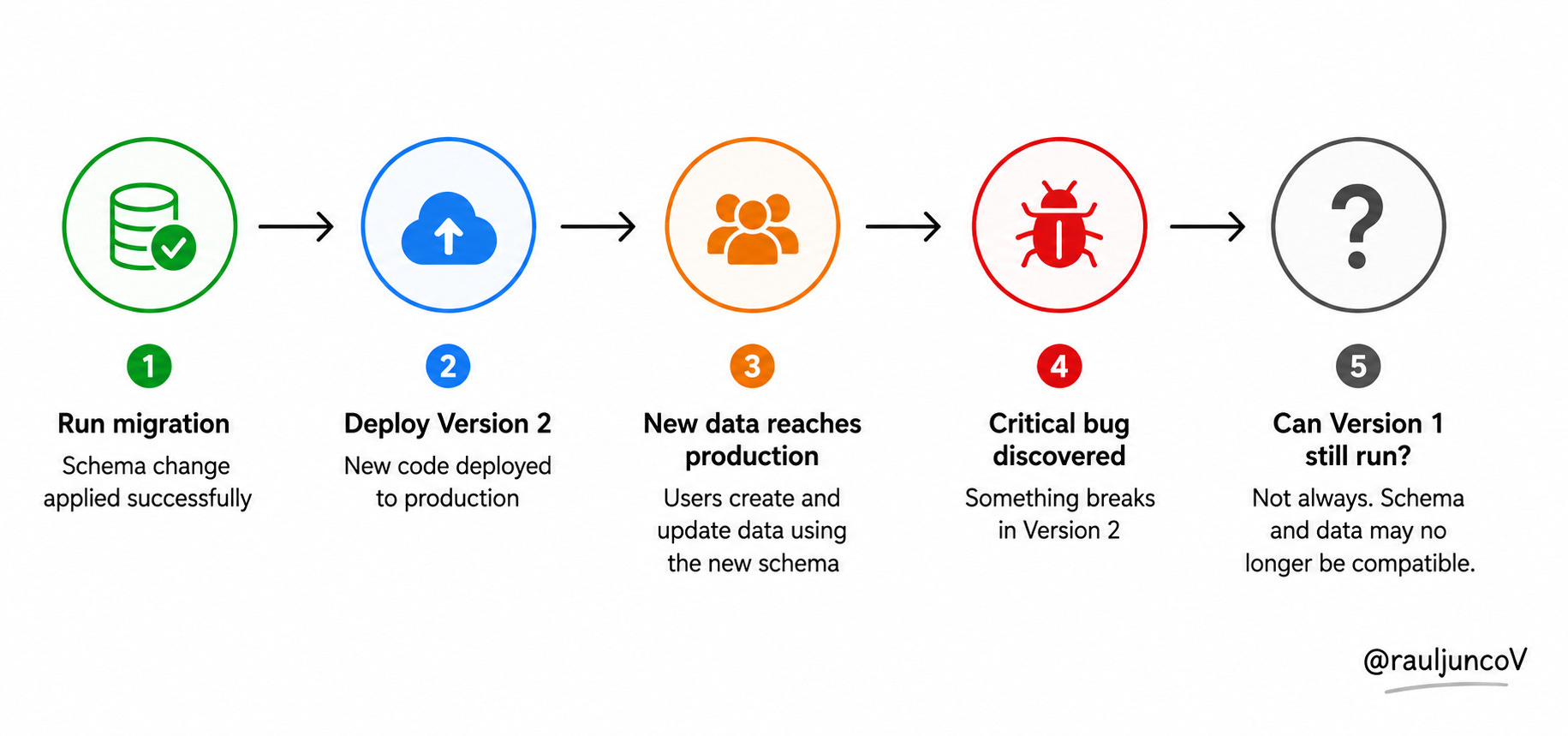
This is a hard lesson: Application rollback != database rollback.
Code is replaceable, but production data keeps changing after every deployment.
That is why safe database rollback starts before deployment, when you decide how the old code, new code, and the changing schema will coexist.
System Design Classroom stays free thanks to sponsors like Tiger Data. Their support allows me to keep creating practical articles and technical diagrams for our community.
Tiger Data builds TimescaleDB, a PostgreSQL extension designed for high-volume time-series data. They add capabilities beyond Postgres, like automatic time-based partitioning, continuous aggregates, and compression.
In the latest release, TimescaleDB 2.27, they introduce bloom filters to avoid decompressing irrelevant batches during updates, deletes, and UPSERTs.
A game-changer for large datasets.
Why Database Rollback Is Hard
Rolling back application code usually means replacing one binary or container image with another.
But the database is different because it stores persistent state. Redeploying the old application does not undo new orders, updated profiles, processed messages, or records created after the release.
Consider a simple column rename.
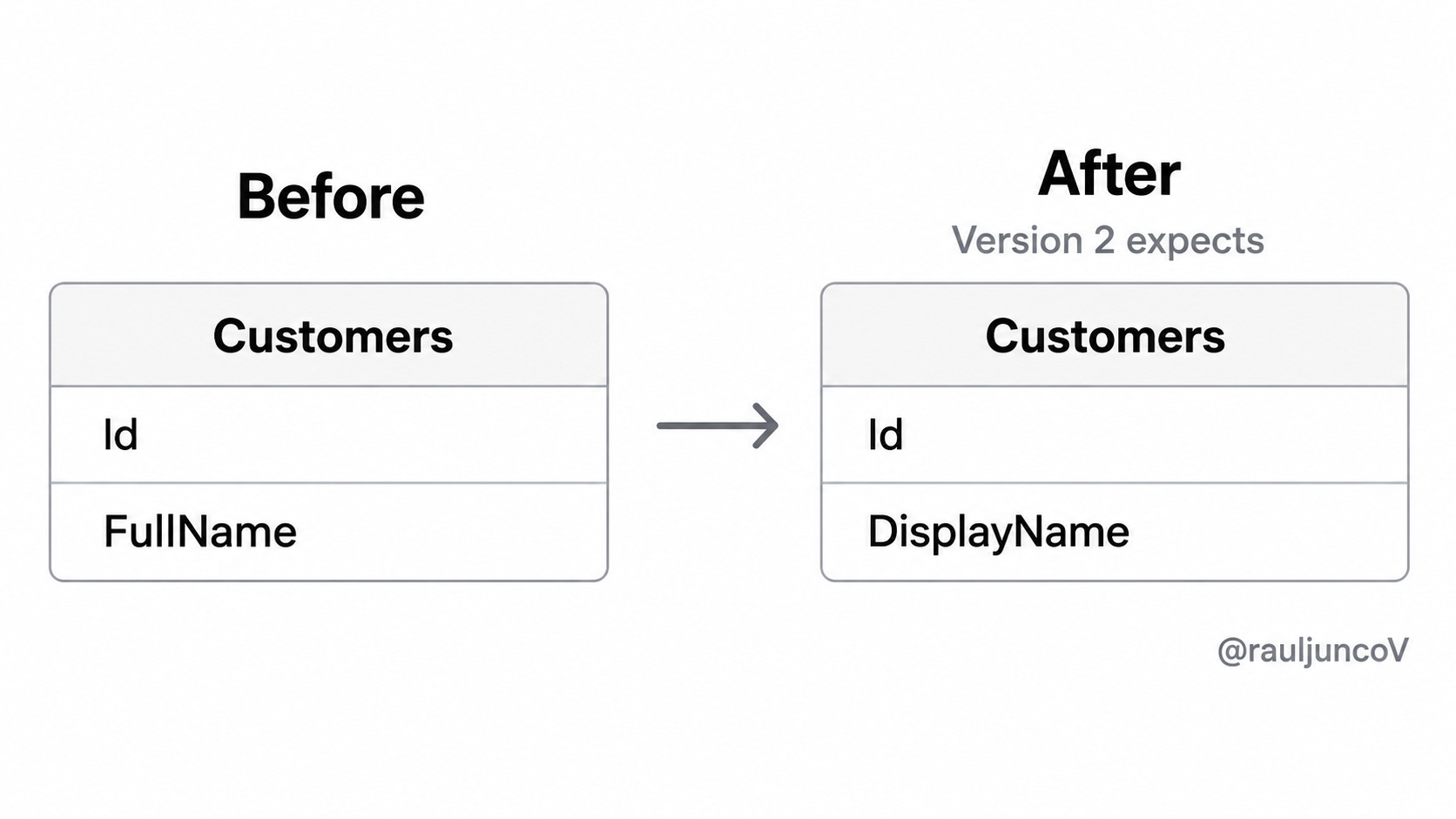
Pretty straightforward, right? The migration succeeded, but version 2 now contains a bug unrelated to the database. You redeploy version 1, which still queries FullName.
And even when the old application and the database are valid, they are no longer compatible.
The problem gets worse if the migration changes values rather than only a simple renaming, because restoring the old schema does not necessarily restore the old data.
Schema Rollback Is Not Data Rollback
I have seen enough migration frameworks telling you this:
Up migration   -> Apply change
Down migration -> Reverse change
And let me tell you what, that model works for simple development workflows, but more importantly, I won't put my money there; it is totally unreliable in production.
Let’s say the new release adds a loyalty tier:

So the application now starts writing “Silver", “Gold", and “Platinum".
A down migration might remove the column:

The schema returns to its original shape, but all loyalty values are lost forever. What happens now when you move forward again, and your customers discover they have to go through the whole process again?
Even worse, this can happen silently, and you never notice it.
VARCHAR(100) -> VARCHAR(20)If the migration truncates longer values, changing the column back to VARCHAR(100) does not restore the missing characters.
This is the same risk you run when you merge fields, delete records, convert free text into enums, or rewrite identifiers. In general, once a migration discards information, rollback cannot reconstruct it unless you have another source of truth (logs, snapshots, CDC, etc.)
I think instead of trying to answer, “Can I reverse this SQL?” we should be focused on, “Can both application versions work with every intermediate database state?”
That question will take us to the first practical rule: classify changes by compatibility before deploying them.
Classify Changes by Risk
Some schema changes preserve compatibility. Others remove your rollback options immediately.
Think about this: adding a nullable column usually allows the old version to keep running because it ignores the new field. On the other hand, dropping or renaming a column can break the old version as soon as the migration finishes.
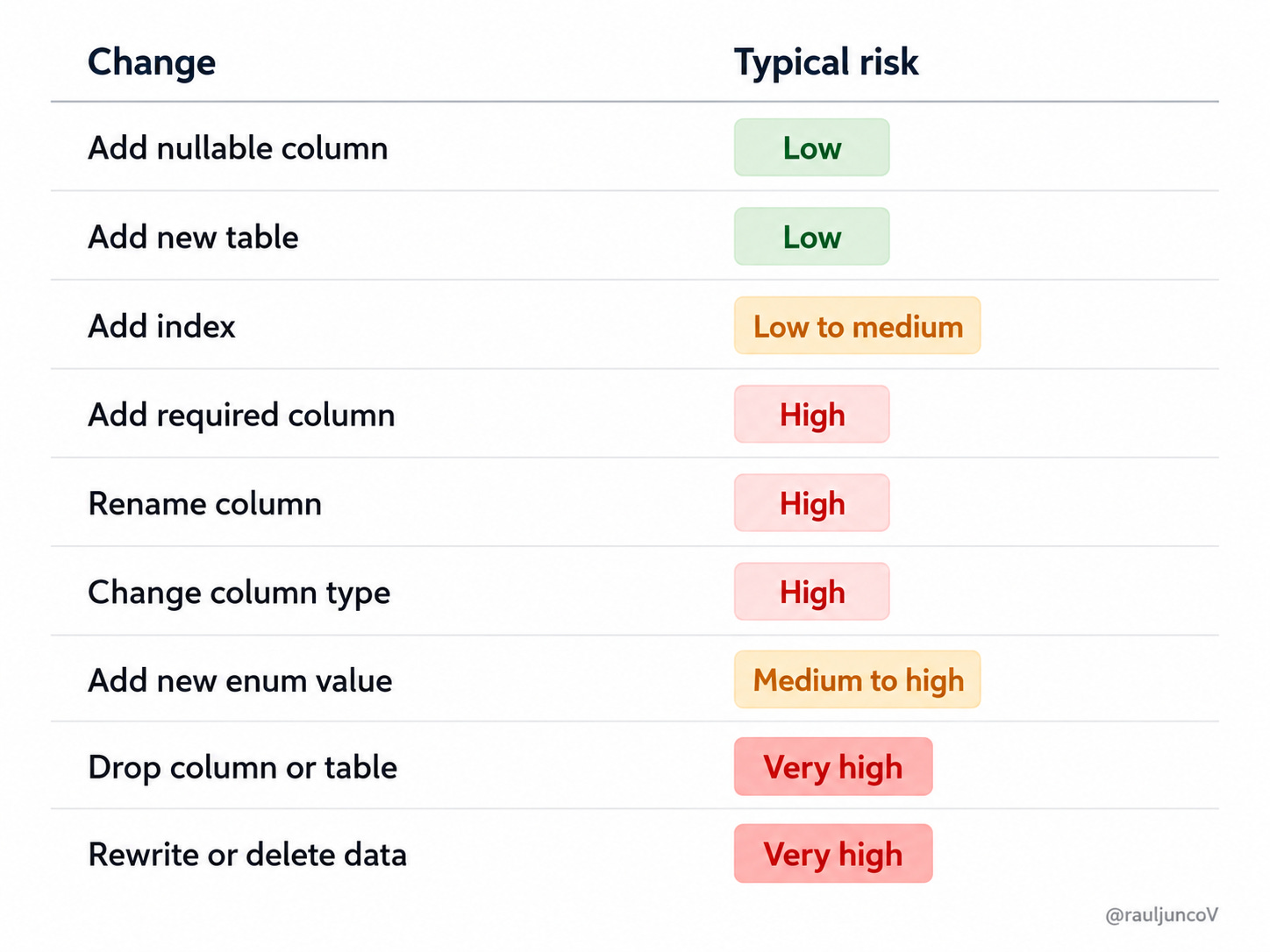
Another lesson I learned the hard way: The SQL statement alone does not determine the risk. Deployment timing matters too.
For example, adding a required column may look harmless. But during a rolling deployment, version 1 may continue inserting rows without that value while version 2 already expects it.
Enum changes create a similar problem. Version 2 may write PendingReview, while version 1 only understands Pending, Approved, and Rejected.
Now the new schema is still there, but the old code can no longer interpret the data.
So here is what you can do: when a change breaks compatibility, do not perform it in one deployment; instead, split it into stages using Expand, Migrate, and Contract.
What is Expand - Migrate - Contract
The whole idea is to turn one breaking change into several compatible changes.
Back to our example, suppose you want to rename FullName to DisplayName.
Instead of renaming the column and deploying the new code, you simply keep both fields temporarily (in bold, so you don’t forget and end up with a DB full of technical debt).
The first phase: Expand
You add the new column without removing the old one.

The database now supports both versions.
Version 1 continues using FullName.
The Second phase: Migrate
You go and deploy code that writes to both columns.
customer.FullName = request.Name
customer.DisplayName = request.Name
save(customer)
Reads can prefer the new value and fall back to the old one, that’s ok.
name = customer.DisplayName ?? customer.FullNameNow go back and fill in the existing rows, so your fields are in sync.

Be careful here. For large tables, process records in batches rather than one long transaction. You don’t want to keep your DB so busy that it can’t handle your customers putting orders.
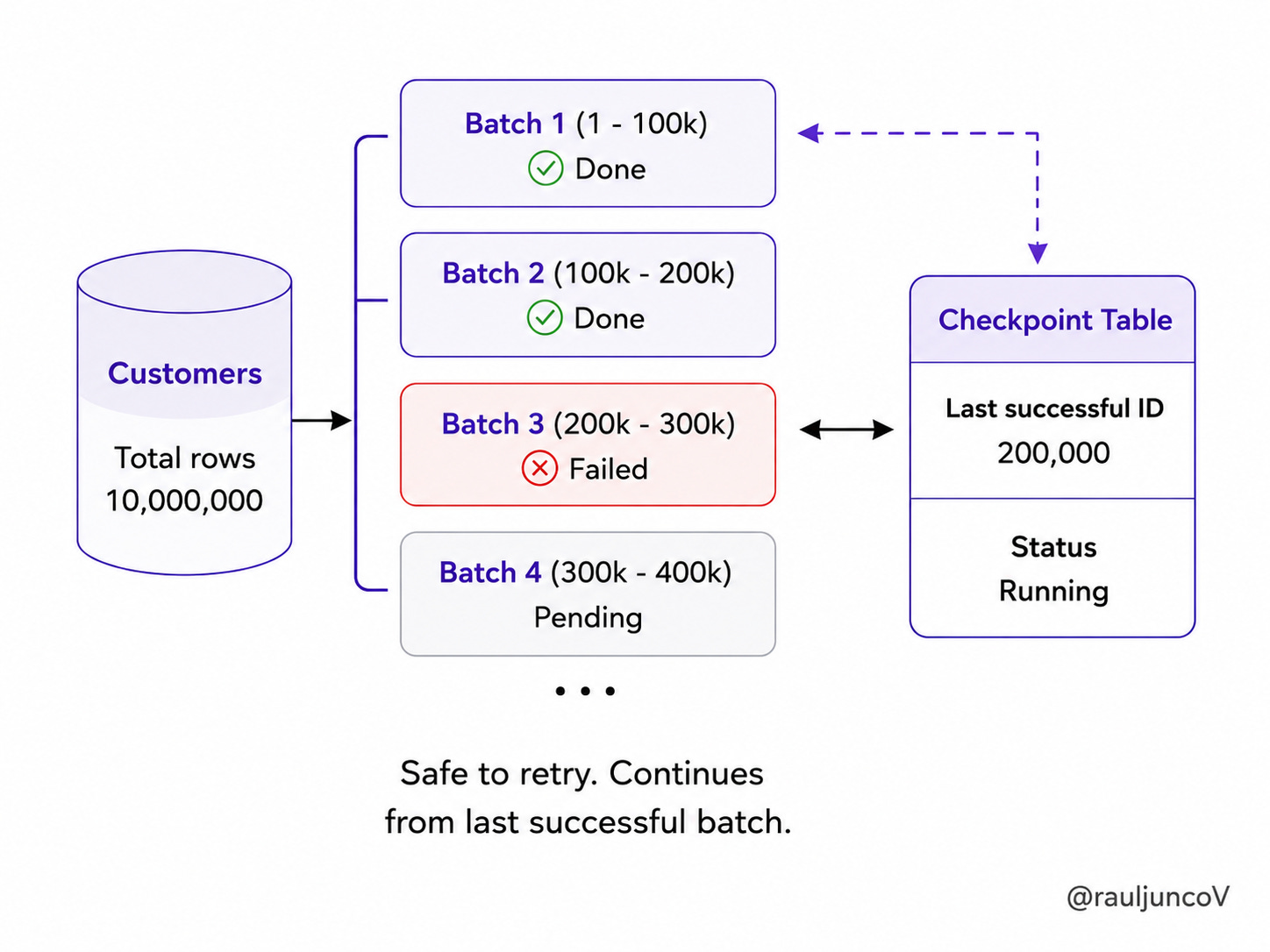
Track progress and make each batch safe to rerun.
Finally: Contract
After the backfill completes, you go and deploy a version that reads and writes only DisplayName.
Important: Do not drop FullName immediately. Keep it within a defined rollback window (your fancy term for the period after deployment when you feel safe to call it done) so the previous version can still run.
The whole process should look like this.
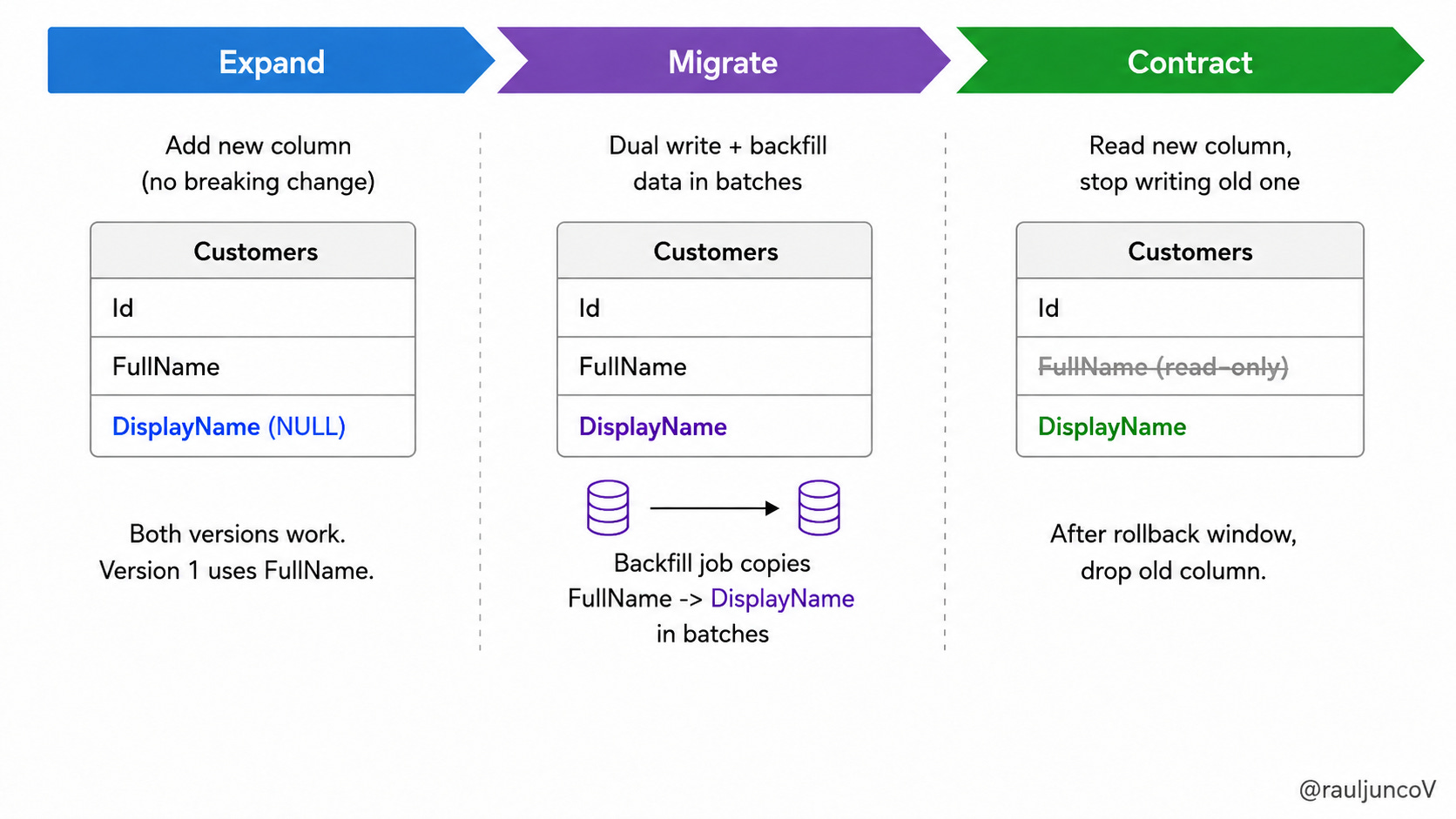
And then remove it later, in a separate deployment, after proving that no code reads or writes it.
This pattern adds temporary complexity, but it trades one risky change for several smaller, recoverable steps.
That said, schema compatibility solves one part of the problem. The next step is preventing deployment from automatically activating risky behavior.
Separate Deployment From Release
This is your safety net, and trust me, it's hard to get right, but once you do, your life changes forever. For large and destructive schema changes, deploying code and enabling a feature should not happen at the same moment.
A safer sequence looks like this:
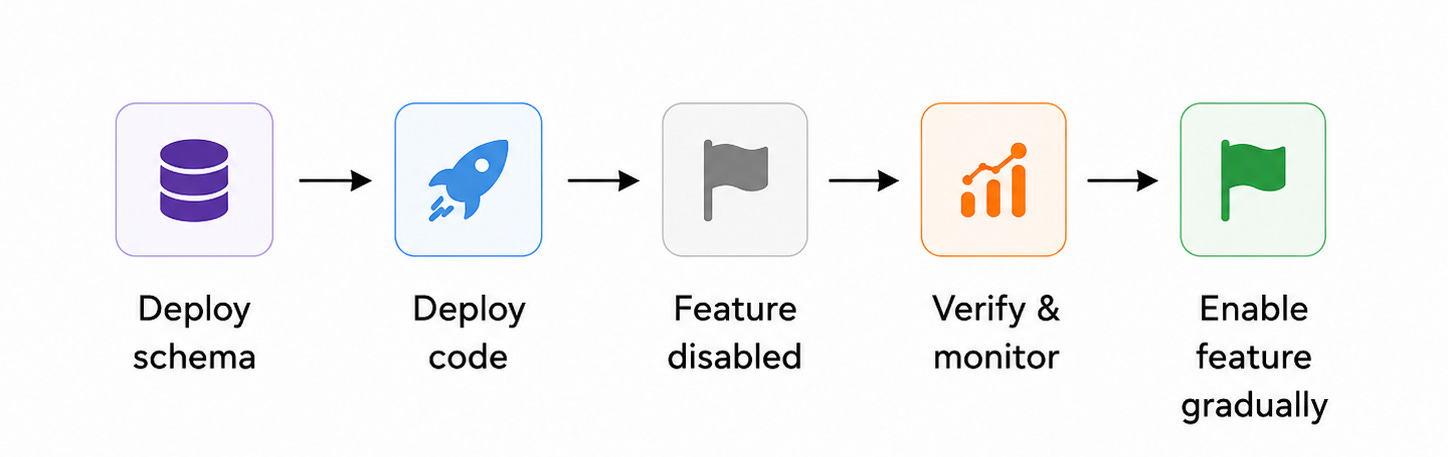
A feature flag gives you a recovery option that does not require reverting the database.
Suppose version 2 introduces a new checkout flow that writes additional payment metadata. If the error rate rises after activation, you can go and disable the feature while leaving the code and schema in place.
This also supports canary releases. You can basically enable the feature for a small percentage of traffic, inspect the new writes, then expand the rollout.
One caveat here: don’t let anyone sell you feature flags as the solution to all your problems; they don't fix data that is already wrong, and they create cleanup work if teams leave them in place forever. Still, they reduce the number of incidents that require an emergency rollback.
One more thing to keep in mind, enabling a feature flag that writes new values should still respect the compatibility table you described earlier: the flag must not let v2 write values v1 can’t read while v1 is still in traffic.
But once traffic reaches both old and new application versions, another issue appears: transitional logic must survive retries and partial failures.
Design Transitional Logic for Failure
Temporary migration code often looks safer on a diagram than it behaves in production.
Dual writes are a good example:
write OldColumn
write NewColumn
If both writes hit the same database and run in a single transaction, you usually get atomicity; once writes cross services or databases, you are talking about a different animal, and you need to treat the migration like any other distributed consistency problem.
If they span separate tables, databases, or services, one write may succeed while the other fails. At that point, you have created a consistency problem rather than solved a migration problem.
Backfills introduce similar risks. A worker may timeout after completing a batch, then retry the same records. Two workers may also process overlapping ranges.
A production backfill should be:
idempotent
restartable
processed in bounded batches
observable
safe to pause
A simple example:

The final condition makes repeated execution safer because already-migrated rows remain unchanged.
I don’t want to keep going, but rolling deployments add one more edge case:
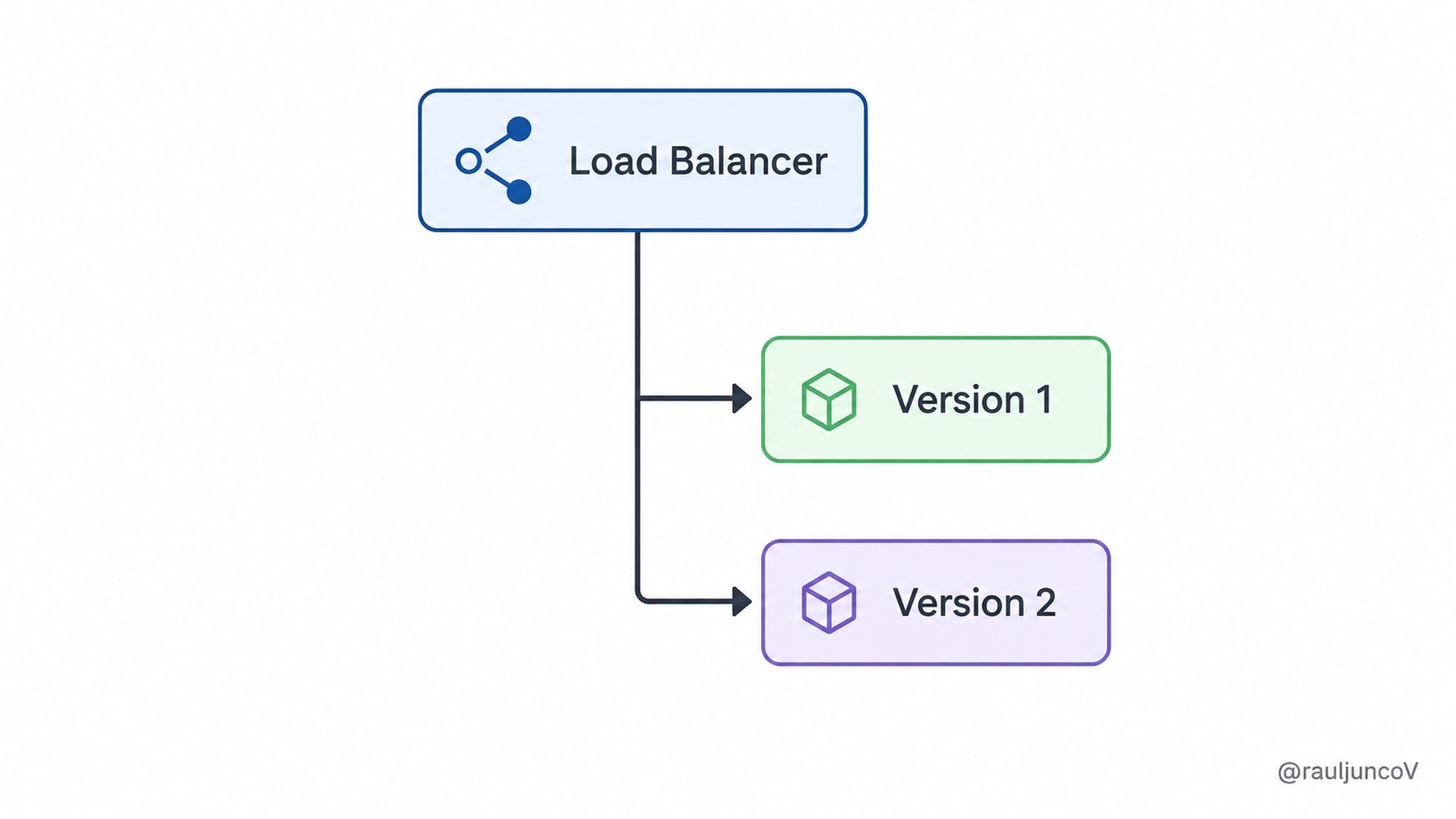
Both versions may run at the same time. The new version must not write values that the old version cannot understand until version 1 has fully left production.
This is why compatibility must hold during every intermediate state, not only before and after the deployment.
And even with careful staging, migrations can still corrupt data, which will require a different recovery strategy.
When Rollback Is No Longer Enough
Suppose a migration calculates the wrong balance for two million accounts. (This might be what happened to AWS a few days ago, when they sent me an alert email at 11 PM with a bill for $3,890,044.04.)
Redeploying the old application stops new bad writes, but it does not repair the existing values.
One of the safest options is a compensating migration: a new forward operation that corrects the known error.

This works when you can identify affected records and reconstruct the correct value from existing data, audit history, or any other source of truth.
But when the original information is gone, you may need to dig deeper into transaction logs, change data capture, snapshots, backups, or point-in-time recovery.
Be careful with full database restores; I rarely recommend that. Restoring the database to a point before the migration may also remove valid orders and updates created afterward.
A safer approach often restores the backup into a separate environment, extracts the missing data, and repairs only the affected records in production.
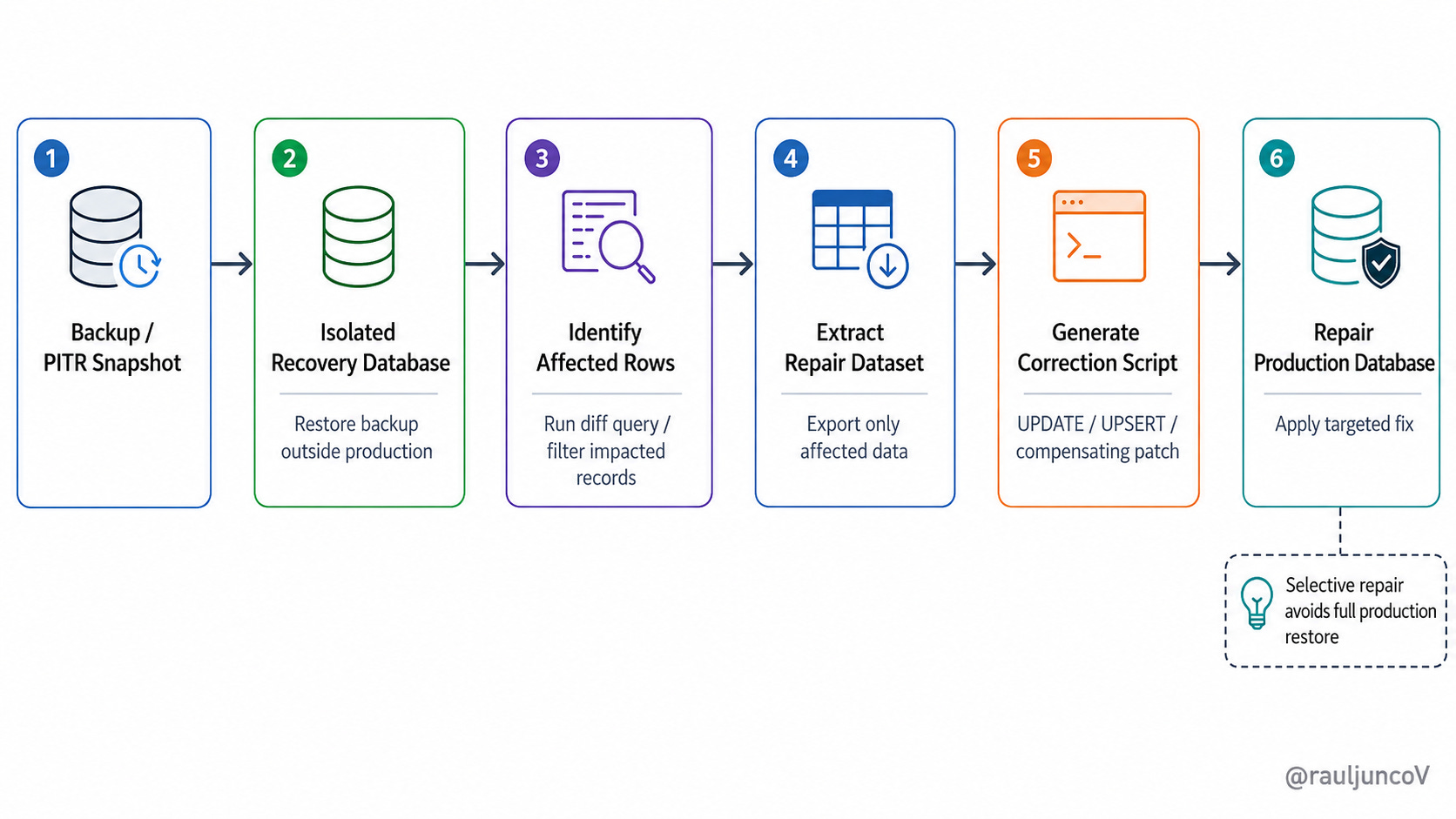
Simply put:
Recovery succeeds faster when the migration leaves enough evidence to show what changed.
This makes observability part of the design.
But, How You Make A Migration Observable?
A migration that reports only “completed” or “failed” gives operators too little information.
For schema changes, I recommend monitoring execution time, locks, blocked queries, replication lag, and error rates.
For backfills, track:
Total rows
Processed rows
Remaining rows
Failed rows
Retry count
Processing rate
You also need verification queries. That “success message“ when the SQL command completes does not prove that the resulting data is correct.
Before dropping an old column, go and confirm that:
No application version reads it
No application version writes it
The backfill completed
The new field contains valid data
The rollback window expired
Observability and verification are what will turn your assumptions into an evidence-based decision.
And with compatibility, staged deployment, recovery options, and metrics in place, the final step is asking the right questions before release.
Pre-Deployment Checklist
(Use this list in case of production migration, not in case of fire, that’s too late for your DB)
Can the previous application version run against the new schema?
Can old and new instances run at the same time?
Does the migration delete or transform information?
Can the migration run safely more than once?
Can a large backfill stop and resume?
How will we verify the resulting data?
Can we disable the new behavior without reverting the schema?
What is the recovery path if the data becomes incorrect?
When will destructive cleanup happen?
Are there other concurrent migrations or releases that could interact with this one?
A migration should not reach production until the team can answer these questions.
Sometimes it will fail no matter what, but your goal is to avoid having to invent a recovery plan during the incident.
My final take
You cannot make every database change reversible. But you can keep your recovery options open because they save data and jobs.
Use backward-compatible changes, migrate data in stages, and delay destructive cleanup until you know the new version is stable.
The safest rollback is the one you planned before deployment.
And that work starts before anyone clicks Deploy.
Until next time,
— Raul
System Design Classroom is a reader-supported publication. To receive new posts and support my work, consider becoming a paid subscriber.