

A user clicks Place Order.
The API returns 200 OK. The order appears in the database. The checkout page shows a success message. From the outside, everything looks fine.
Then support gets a ticket.
The customer never received a confirmation email. Inventory never moved. The warehouse system never saw the order. Analytics never recorded the purchase.
Now the team has a strange problem.
The order now exists in one place, but not in the rest of the system.
Not in the boxes on the diagram. Not in the clean arrows between services. Not in the happy path everyone reviewed during planning.
It gets lost in the gaps between components, where one operation succeeds, another fails, and the system enters a state nobody designed for.
Most system design mistakes hide between the boxes.
They show up when a database commit succeeds but an event never publishes. When a replica lags behind the primary. When one request triggers ten downstream workflows. When a queue keeps accepting work faster than consumers can process it. When a harmless schema change breaks a forgotten consumer.
Most teams already have databases, queues, caches, APIs, logs, dashboards, and cloud infrastructure. The harder part is understanding the failure patterns that appear when those tools interact.
These five concepts help build that instinct.
The agent harness wasn’t supposed to be the black box
Agent loop is the most important piece of infrastructure in your workflow right now and for most developers, it’s the one piece they can’t open up. Agent builders have to jump through all the hoops themselves, crafting the infrastructure and tools, testing the harness, while fighting to maintain what they’ve built.
Meet Cline SDK: agent harness behind Cline 2.0, fully open-sourced. The same runtime that powers Cline across VS Code, JetBrains, and the CLI is now an npm install away: npm i @cline/sdk. Inspect it, fork it, extend it, ship on it.
Best-in-class harness: 74.2% on Terminal-Bench 2.0 with Claude Opus 4.7 ahead of Claude Code (69.4%) and strongest numbers published on open-weight models.
Open model & provider choice: Anthropic, OpenAI, Google, Bedrock, Mistral, or any OpenAI-compatible endpoint.
Real plugin system: Register tools, hooks, commands, providers, message builders. Prototype as a local file, harden into a package. Extend it freely for any of your agent use cases.
Scheduled + event-driven agents: Cron and event specs for PR reviews, dependency checks, coverage audits, changelogs no separate orchestration layer.
Stop building around your agent. Start building on it.
Install Cline SDK today: npm i @cline/sdk Or try the rebuilt harness directly: npm i -g @cline
1. The Dual-Write Problem
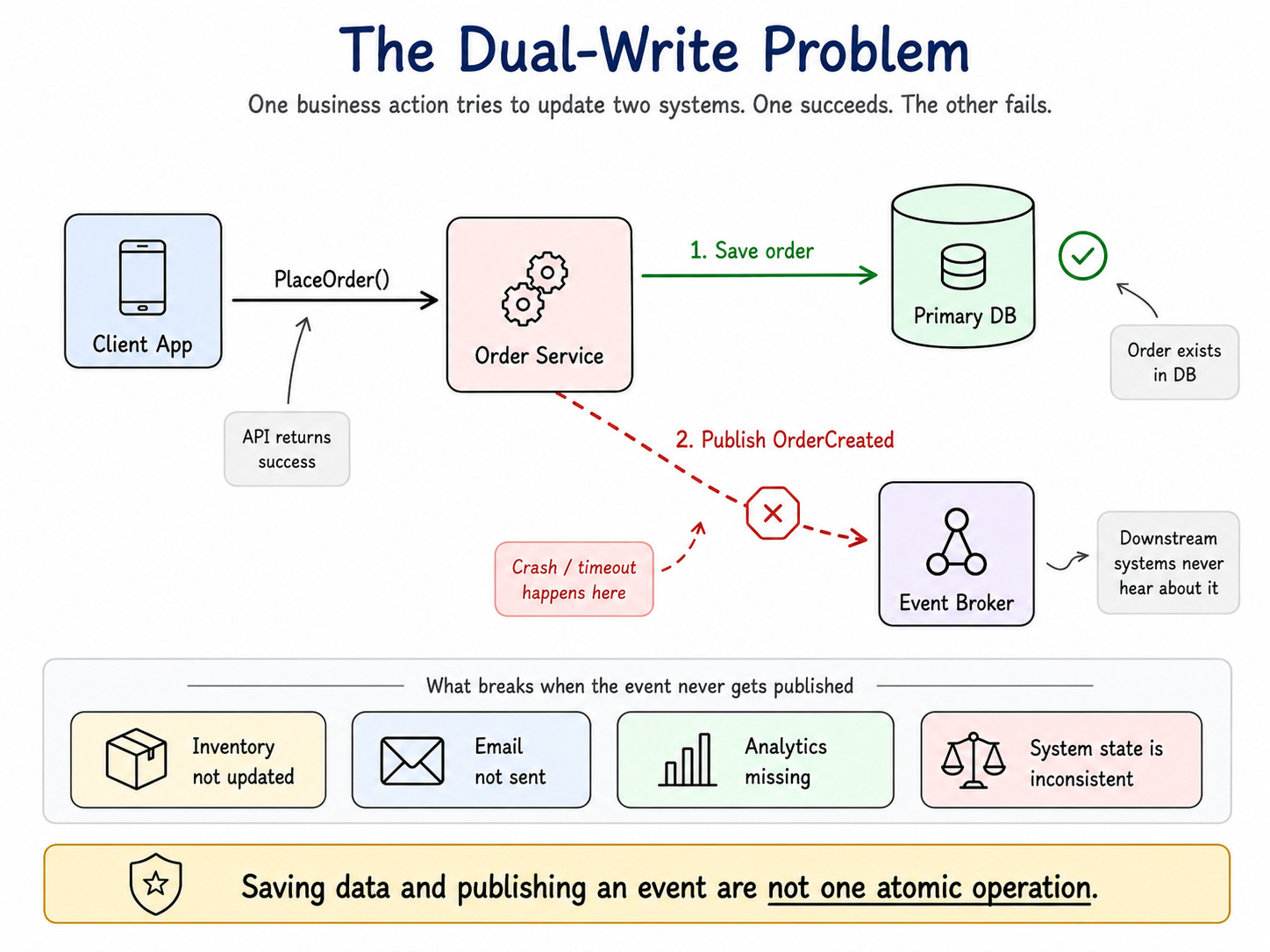
The dual-write problem happens when one business action needs to update two different systems.
A common example is saving an order to a database and publishing an OrderCreated event to a broker.
The flow looks simple:
You start with code like this:

This code looks reasonable. It may work for months. It may pass every test. It may survive low traffic without obvious problems.
Then production does what production always does.
The database write succeeds, but the event publish fails.
Now the order exists, but nobody else knows about it. Inventory does not reserve stock. Email does not send confirmation. Shipping does not prepare fulfillment. Analytics does not count the sale.
The system has split into two versions of reality.
One part says, “The order exists.”
Another part says, “I never heard about it.”
That is the dual-write problem.
What’s at stake
The scary part is not the failure itself. The scary part is how quiet the failure can be.
The API may still return success. The database may look correct. The logs may show one small broker timeout buried under thousands of successful requests. But downstream systems now depend on an event that never arrived.
That creates missing workflows, broken reports, confused support teams, and customer experiences that feel random.
This is why “just publish an event” is not a complete architecture decision.
Event-driven systems need more than publishing events. They need a reliable way to record that something happened and make sure the rest of the system eventually learns about it.
Walk through a solution
The database write and the event publish should not live as two unrelated operations. They represent one business fact:
The order was created.
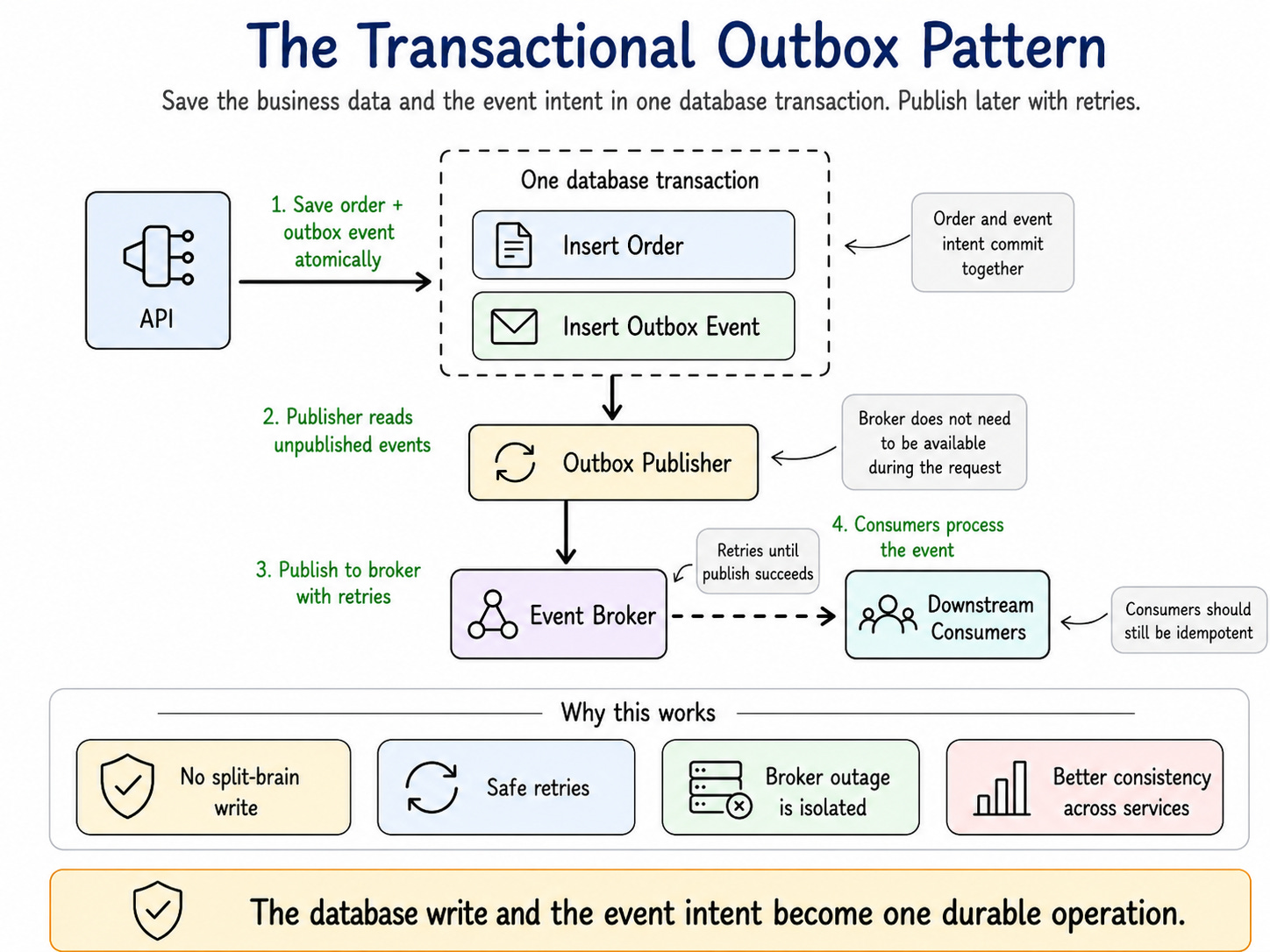
A common solution is the Transactional Outbox Pattern.
Instead of saving the order and publishing the event directly, the service saves the order and writes an event record into an outbox table in the same database transaction.
The code becomes:

Now the order and the event record commit together.
If the transaction fails, neither one gets saved. If the transaction succeeds, the system has a durable record that an event must be published.
A separate process reads from the outbox table and sends events to the broker.

This turns a fragile two-step operation into a retryable workflow.
The request path no longer depends on the broker being available at the exact moment the user clicks Place Order. It only needs to persist the event intent safely.
Even if the broker is down, slow, or unreachable, the intent survives in the database, and the publisher will get to it.
How to apply this tomorrow
For brokers and webhooks, an outbox-style publisher often works well. For external APIs, you may also need idempotency keys, retry policies, and compensation logic.
For the most critical path you find (for example, order creation), sketch how you would replace the direct publish with an outbox table write in the same transaction, plus a small background publisher that drains that table
Realistic considerations
The outbox pattern improves reliability, but it does not remove all complexity. It only changes the shape of the problem.
The publisher might publish the event and crash before marking it as published. When it restarts, it may publish the same event again.
The outbox does not guarantee exactly-once processing. It guarantees the event intent is durably recorded with the business write. Publishing and consumption are still usually at-least-once, so consumers must remain idempotent.
This is why idempotency matters in event-driven systems. You cannot assume each message arrives only once.
You also need monitoring. If the outbox table grows, your publisher may be falling behind. That means the main system accepts orders faster than the rest of the platform can react to them.
The dual-write problem teaches you how systems split when two operations pretend to be one. But once you have a reliable event stream, new problems emerge when different views of the data fall out of sync.
The next concept teaches you why even successful writes can still produce stale user experiences.
2. Read-Write Splitting
Reads and writes do not scale the same way.
Reads are easier to multiply. You can add read replicas, cache responses, create materialized views, use search indexes, or push static assets to a CDN.
Writes are harder because a write changes state. Once state changes, the system must decide who owns the truth, how conflicts get resolved, and when other copies catch up.
That is why scaling reads often feels simple, while scaling writes exposes deeper design questions.
Most systems begin with one database.
This works for a while. Then the product grows.
Dashboards query large tables. Mobile apps poll more often. Search pages scan too much data. Internal tools run heavy reports. The primary database starts doing too much work.
So the team adds read replicas.
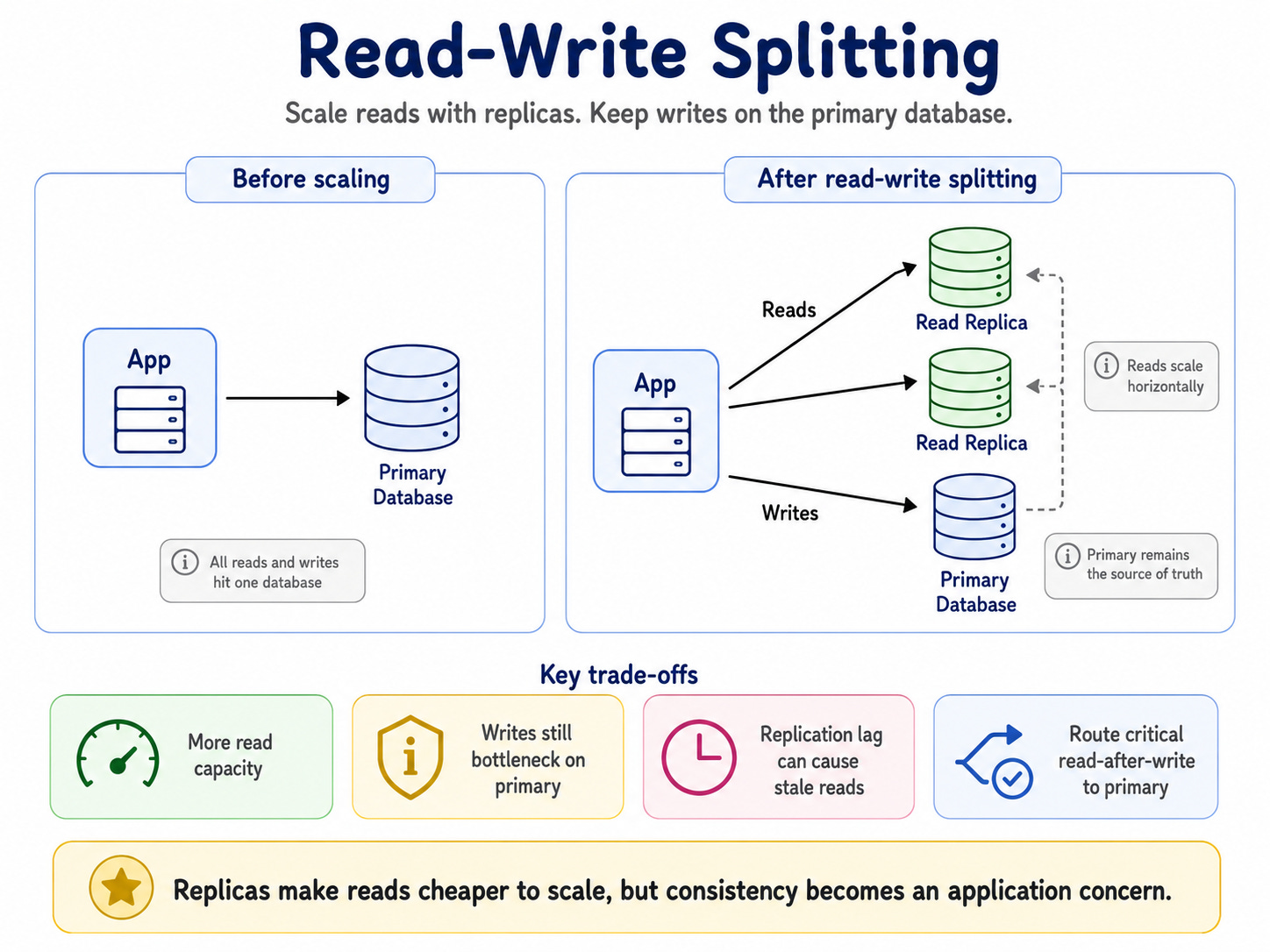
Read traffic now spreads across multiple machines.
That helps.
But it introduces a new problem: replication lag.
The primary database gets the write first. Replicas catch up later. That delay may be milliseconds, seconds, or during incidents, minutes.
What’s at stake
Replication lag creates stale reads.
A user creates an order. The write commits to the primary database. Then the user refreshes the page. The application reads from a replica that has not caught up yet.
From the user’s perspective, the order disappeared.
T0: User creates order
T1: Primary commits order
T2: User reads from replica
T3: Replica catches up
Between T1 and T3, the system tells two different stories.
The primary has the new order. The replica does not.
That does not mean read replicas are bad. It means consistency has become an application concern.
Walk through a solution
The solution starts by classifying reads.
Not every read needs fresh data. Some reads must reflect the latest write. Others can tolerate delay.
Strong consistency reads usually include things like:
- Show me the order I just placed.
- Did my payment succeed?
- What is my account balance?
- Can I withdraw this amount?
Those reads should usually go to the primary database, or use another strategy that guarantees fresh results.

Eventually consistent reads include things like recommendations, trending items, search results, analytics dashboards, and recently viewed products.
Those can usually use replicas, caches, or projections.
A common strategy is read-your-writes.
After a user performs a write, route that user’s next reads to the primary database for a short window.
This gives users a more consistent experience without forcing every read to hit the primary.
How to apply this tomorrow
List three queries in your product that absolutely must show users fresh data (for example, “show my latest order,” “current account balance,” or “payment status”).
For each one, verify whether it currently reads from a replica or cache. If it does, add a rule in your data-access layer so those reads always go to the primary or use a “read-your-writes” flag right after the write.
Realistic considerations
Read-write splitting trades database pressure for consistency complexity.
You reduce read load on the primary, but now you need routing logic, lag monitoring, fallback behavior, and clear decisions about what “fresh enough” means.
A stale analytics dashboard may be fine. A stale account balance may be unacceptable. A stale product recommendation may not matter. A stale payment status may create support tickets immediately.
A good system does not treat every query the same. It matches the consistency level to the business risk.
Read-write splitting teaches you that scaling is not just about adding copies. It is about understanding when those copies are allowed to disagree.
And once a write succeeds, it often triggers many downstream operations. That is where the next concept starts to hurt.
3. Fan-Out
Fan-out happens when one action triggers many downstream operations.
The user sees one button. The system sees a chain reaction.
A user clicks Place Order. Behind that one action, the platform may need to authorize payment, reserve inventory, create a shipment, send a confirmation email, update loyalty points, emit analytics, notify fraud detection, sync CRM data, and update recommendations.
The architecture may look like this:
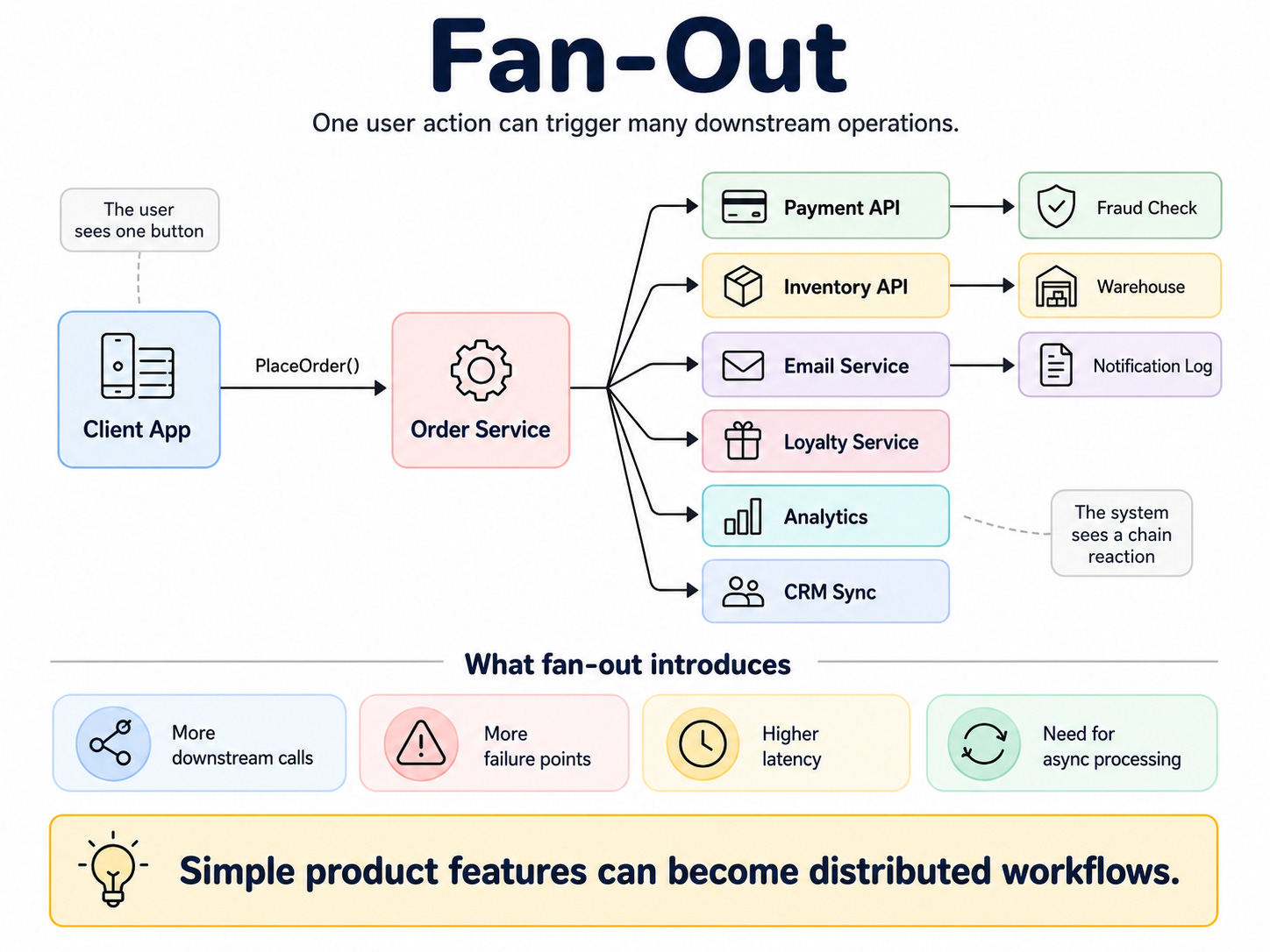
It turns simple product requirements into distributed workflows.
What’s at stake
Fan-out increases the number of ways a request can partially fail.
If one action depends on eight downstream systems, what happens when the fifth one fails? Do you fail the entire request? Retry? Continue? Compensate? Tell the user everything succeeded? Alert support?
Without a clear answer, the system enters a messy middle state.
Payment succeeds, but inventory fails. Inventory succeeds, but email fails. Email succeeds, but analytics fails. Fraud check times out, but the order ships anyway.
Each dependency adds latency, failure modes, and operational responsibility. The Fan-out exposes the hidden cost of your features.
This is why synchronous fan-out can become dangerous. The more work you put on the request path, the more fragile the user experience becomes.
Walk through a solution
The first step is to separate critical work from secondary work.
Critical work must happen before the user receives confirmation. Secondary work can happen later.
For an order flow, the critical path may be:
1. Validate the order.
2. Authorize payment.
3. Reserve inventory.
4. Save the order.
That path should stay as short as possible.
Everything else can happen asynchronously.
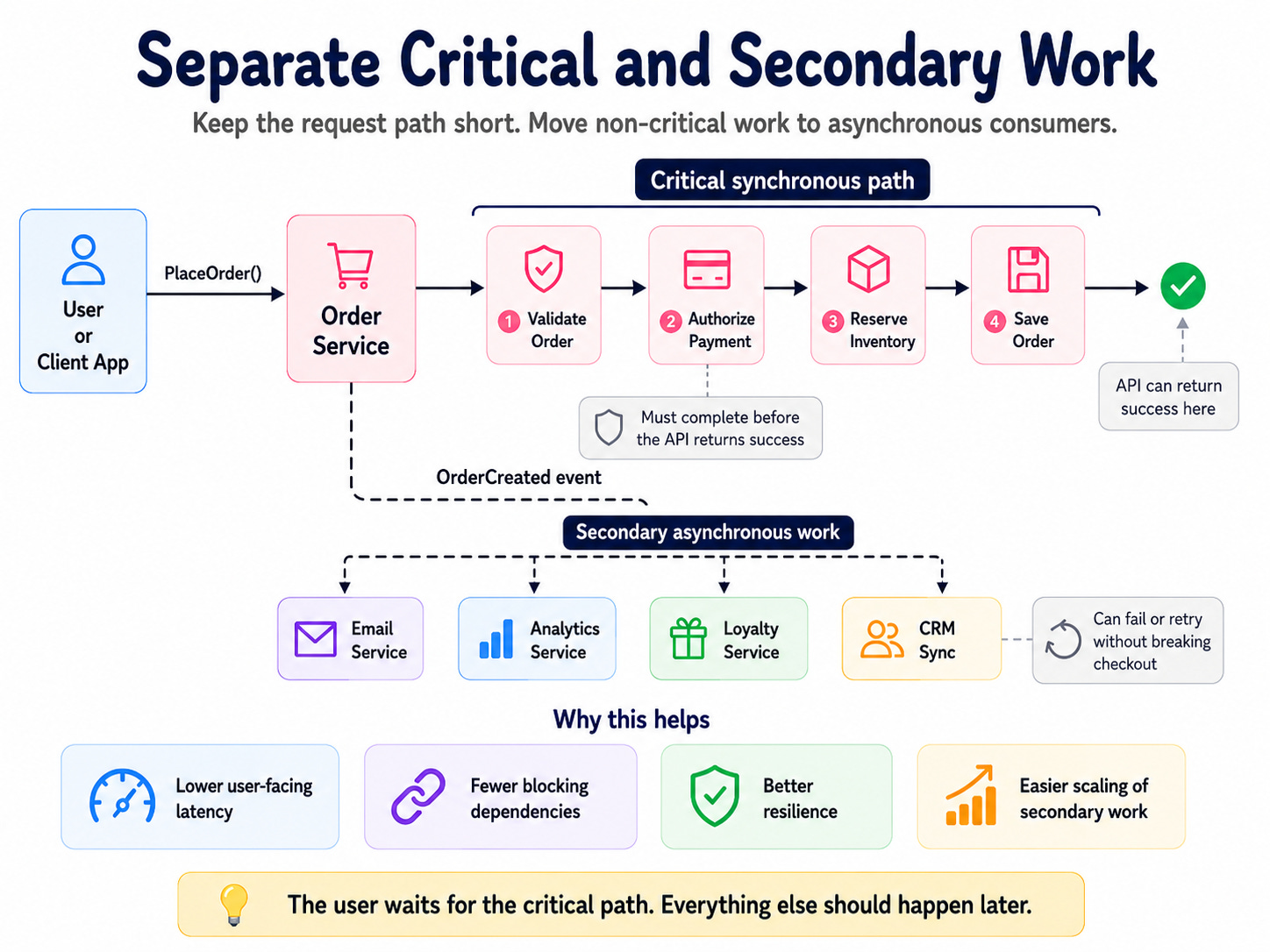
The API can return success after the critical path completes. Then event consumers handle secondary work.

Consumers react later:

This design protects the user experience.
The order should not fail because the email provider has a temporary outage. The analytics system should not decide whether checkout succeeds.
How to apply this tomorrow
Take one user action in your system (for example, “place order” or “create account”) and write down every downstream system it touches: payments, email, analytics, CRM, fraud, and so on.
Mark which ones truly need to succeed before you show success to the user.
Then pick one non-critical step (for example, analytics or CRM sync) and move it behind an event so it can run asynchronously instead of on the request path.
Realistic considerations
Async fan-out does not make failures disappear. It changes when and where they happen.
Now you need to handle duplicate events, retries, dead-letter queues, correlation IDs, and visibility across services.
For example:
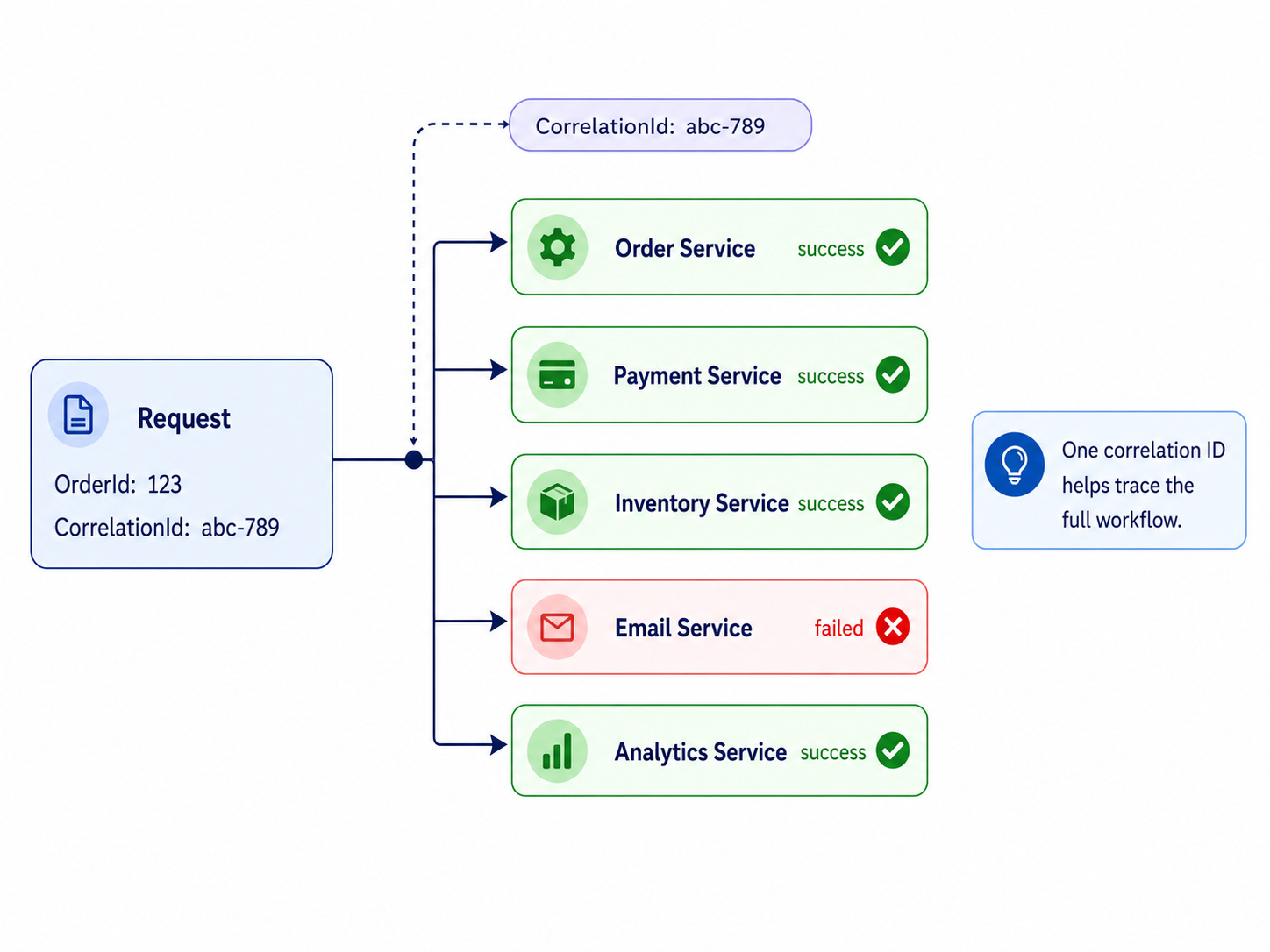
Without this visibility, debugging becomes guesswork. A log line in one service will not explain a distributed workflow.
A correlation ID helps you trace a workflow. It does not replace an idempotency key or processed-event table.
Fan-out teaches you that one user action can create many independent failure points. Once those failures move into the background, you need to know whether the system keeps up.
That is where queues start telling the truth.
4. Queue Depth
Queues do not remove load. They move work-load into the future.
That trade-off is useful, but it can also obscure problems.
A queue can absorb spikes, decouple producers from consumers, and make systems more resilient. But a queue can also hide failure. The system can look healthy while the backlog quietly piles up.
Most queue-based systems look simple:
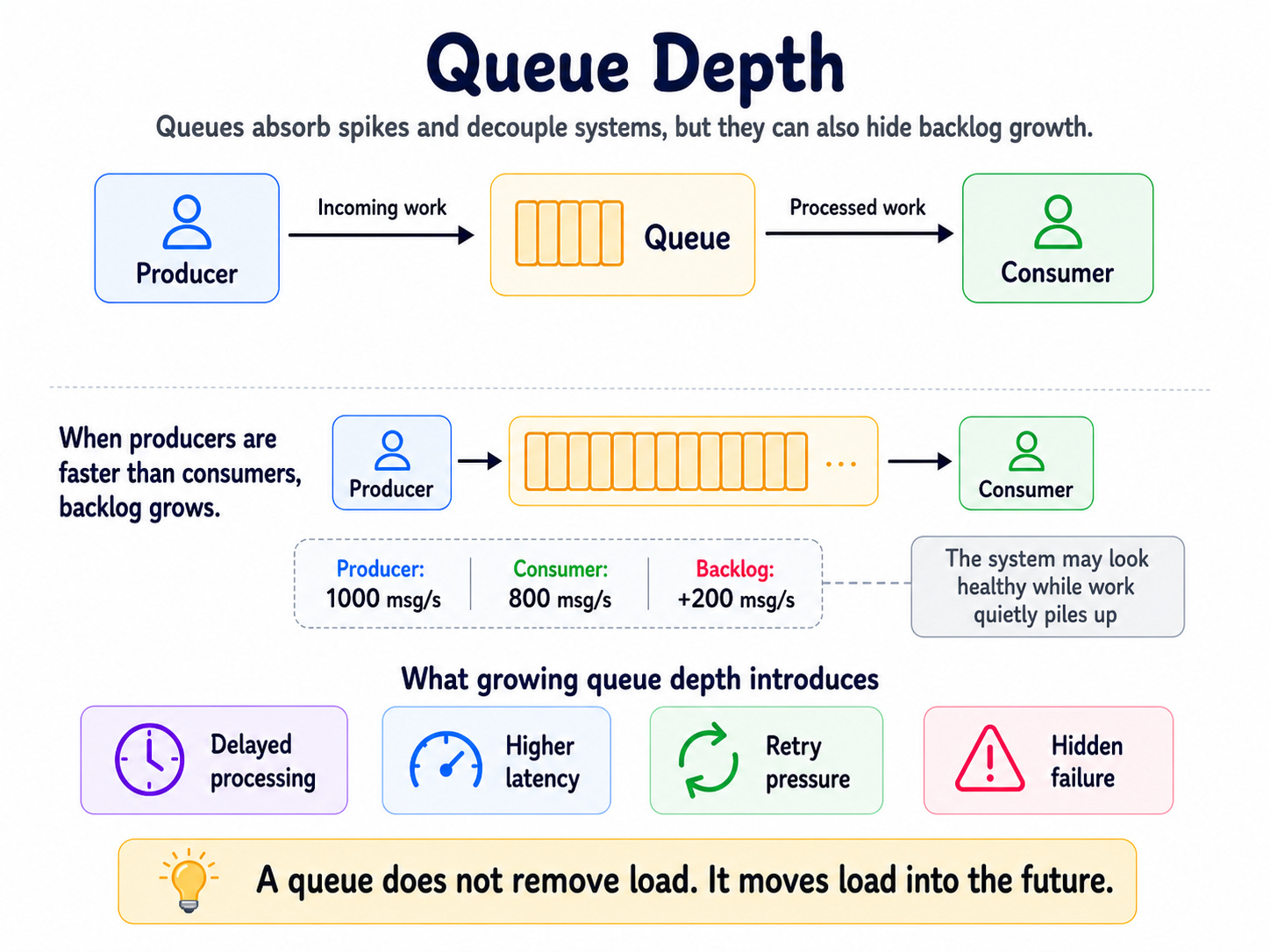
The producer creates messages. The queue stores them. The consumer processes them.
This works when the consumer keeps up.
But imagine the producer sends 1,000 messages per second and the consumer processes 800 messages per second. The system falls behind by 200 messages every second.
After 10 minutes, the queue has 120,000 extra messages. After one hour, it has 720,000 extra messages.
Nothing’s exploded. No service has crashed yet. But the system now runs far behind reality.
That is why queue depth matters.
What’s at stake
A growing queue means the system accepts work faster than it completes work.
At first, this feels fine. The API still responds. The broker still accepts messages. Consumers still process some work. Dashboards may even look green.
But user-visible latency grows. Emails arrive late. Inventory updates lag. Payments reconcile slowly. Analytics becomes stale.
Eventually, messages may expire, retries may increase, and consumers may fail harder. The queue turns from a buffer into a backlog.
A growing queue is not progress. It is delayed pain.
Walk through a solution
Queue depth alone is not enough. You will need a few signals together:
Queue depth
Oldest message age
Producer rate
Consumer rate
Retry count
Dead-letter count
Consumer error rate
Queue depth tells you how much work waits. Oldest message age tells you how late reality is.
That second metric often matters more.
A queue with 100,000 messages may be fine if consumers drain it quickly. A queue with 500 messages may be a serious issue if the oldest message is six hours old.
A simple model helps:
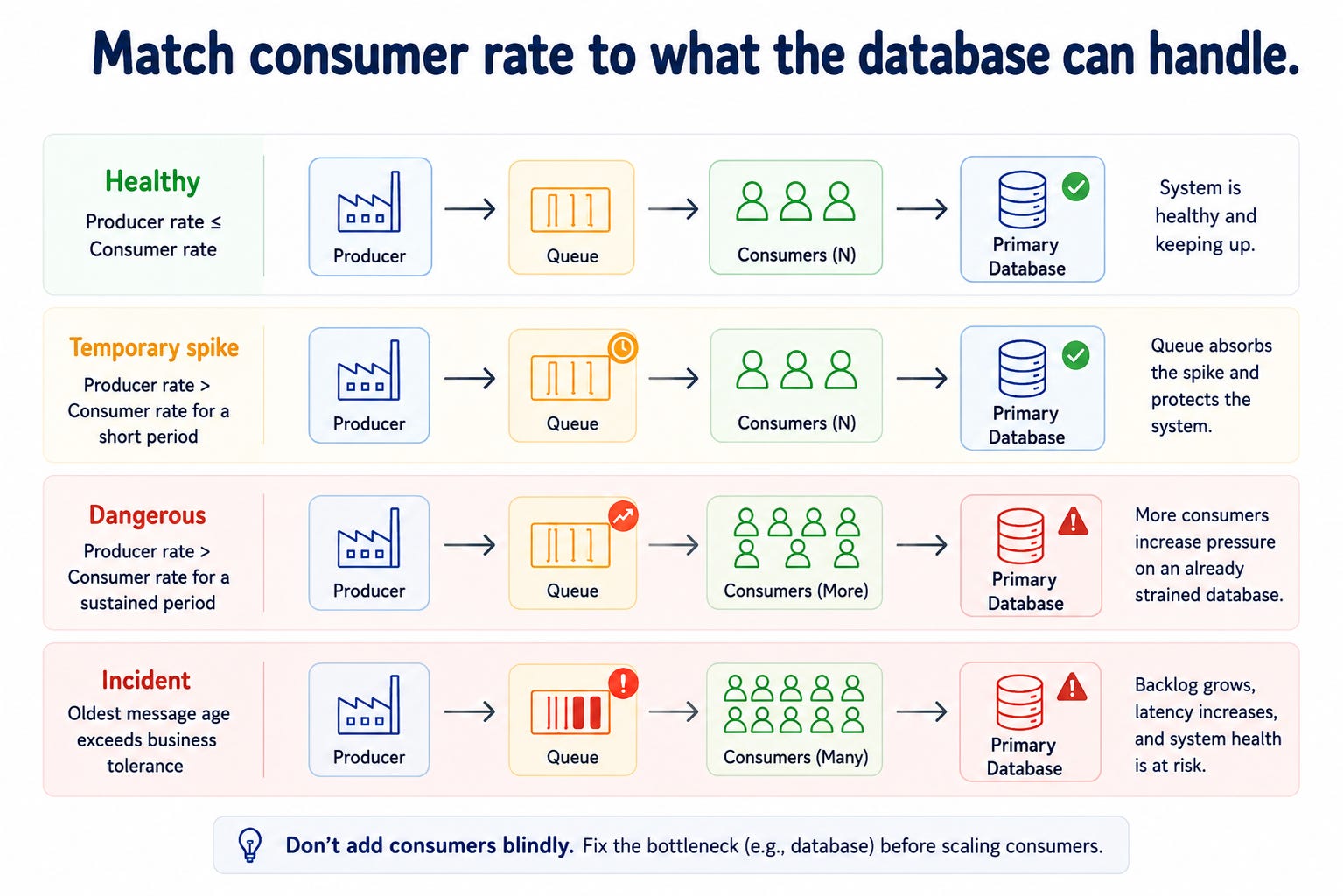
Once you detect the problem, you have options.
You can add consumers, slow producers, shed non-critical work, split workloads into separate queues, optimize the consumer, or fix the real downstream bottleneck.
The key is to avoid blindly adding consumers.
If consumers are slow because they are blocked on database writes, locks, connection pools, or downstream rate limits, adding more consumers only increases pressure on the same bottleneck.
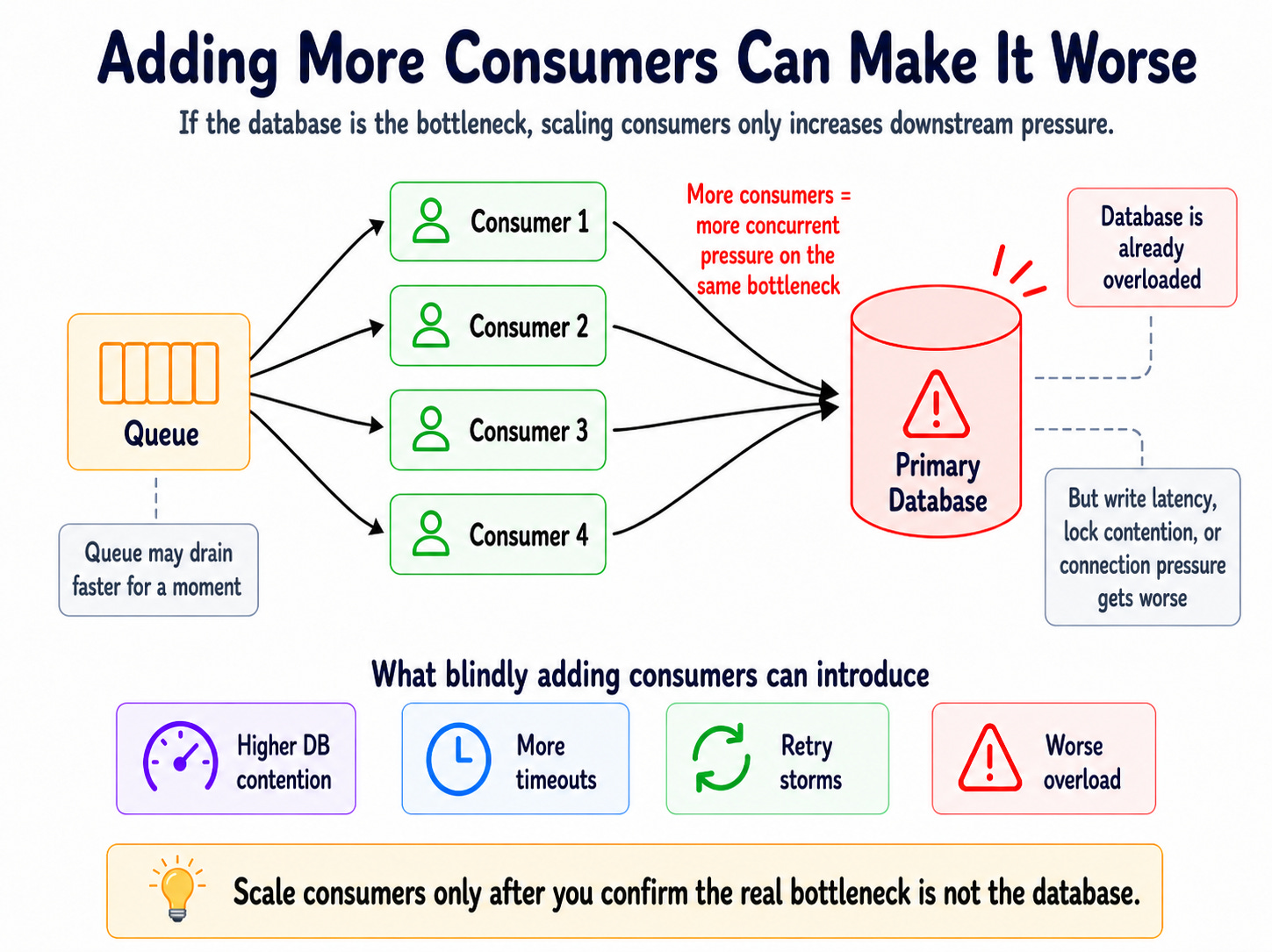
Now the queue drains faster, but the database melts.
How to apply this tomorrow
For one queue in production, add two alerts: one on queue depth and one on “oldest message age” (how long the oldest unprocessed message has been waiting).
Start with a simple rule like “page us if the oldest message is more than 5 minutes old.” Then, watch what happens the next time traffic spikes, before you reach for more consumers.
Realistic considerations
Queues need backpressure. Backpressure is a signal from consumers to producers: “slow down, I'm overwhelmed.”
When consumers fall behind, producers need a signal, and sometimes the system should reject non-critical work.

Sometimes the system should disable expensive features. Sometimes the system should prioritize critical workloads.
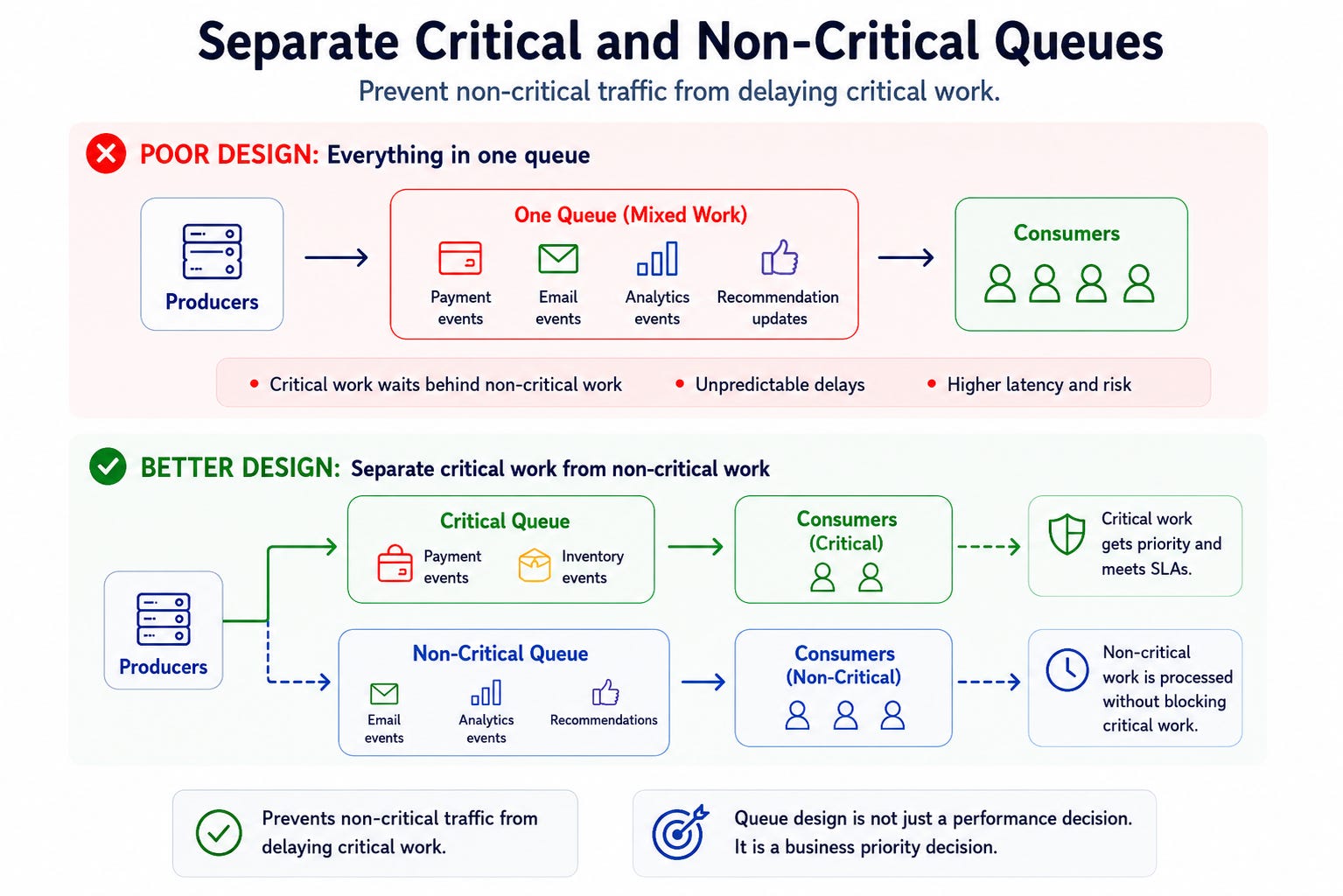
This prevents non-critical traffic from delaying critical work.
Queue design is not just a performance decision. It is a business priority decision.
Queue depth teaches you that async systems can fail slowly. But even if messages move perfectly, one more thing can still break the system: the contract inside the message.
That brings us to schema evolution.
5. Schema Evolution
A field rename sinks downstream services. A semantic change corrupts data for days before anyone notices.
This applies to APIs, events, database tables, files, and anything another system reads. Once another system depends on your data shape, that shape becomes a contract.
Looks harmless.
But every consumer expecting total may break.
That is schema evolution.
What’s at stake
Schema changes often fail in painful ways.
The producer may work perfectly. The service may deploy successfully. The API may pass its tests. The event may even publish correctly.
But a downstream consumer may fail because it expected the old field.
Even worse, the consumer may not fail. It may read null, skip a calculation, write incorrect data, or generate a wrong metric.
That kind of failure creates silent corruption.
You can see a broken request instantly. Bad data can spread for days before anyone notices.
Walk through a solution
The safest approach is backward-compatible change.
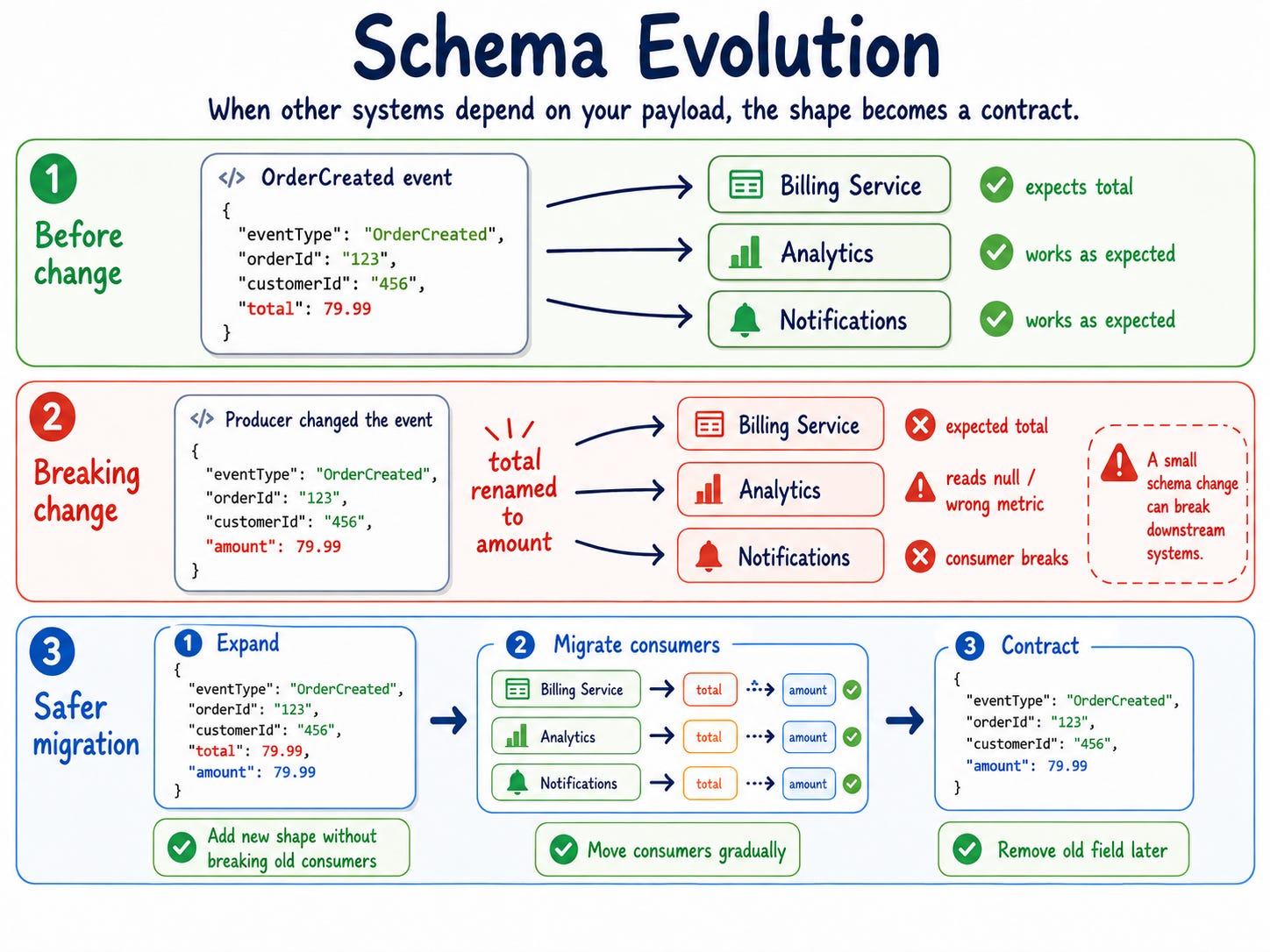
Then migrate consumers gradually.
Step 1: Producer emits old field and new field.
Step 2: Consumers move to the new field.
Step 3: The team monitors usage of the old field.
Step 4: Producer removes the old field after migration.
This is the expand/contract pattern.
This allows old consumers to keep working while new consumers adopt the new contract. It also avoids coordinated deployments across multiple teams.
Realistic considerations
Schema evolution is not only about field names.
Meaning matters too.

What does active mean?
Does it mean the user created an account? Verified their email? Has a paid subscription? Logged in within the last 30 days?
The field name did not change. The data type did not change. But the meaning can still drift.
That is a semantic breaking change.
This is harder to catch than a missing field. You need ownership, documentation, contract tests, and clear event definitions.
You also need versioning discipline.
But versioning everything creates a mess. Creating v2, v3, and v4 for every small change creates long-term maintenance debt.
A better rule:
If existing consumers can continue working unchanged, you probably don’t need a new version. If any must change behavior to remain correct, you do.
If you can add a field safely, avoid a new version. If you change what a field means, create a new contract.
Schema evolution teaches one of the most important system design lessons: systems do not only depend on data. They depend on what the data means.
These five concepts look separate, but they are connected.
The dual-write problem explains how data and events get out of sync. Read-write splitting explains why users may see stale data. Fan-out explains how one request becomes many failure points. Queue depth explains how systems fall behind without crashing. Schema evolution explains how contracts break as systems change.
Together, they show why production systems fail in non-obvious ways.
Did the database commit?
Did the event publish?
Did the consumer receive it?
Did the consumer process it twice?
Did the replica catch up?
Did the queue grow?
Did the schema change?
Did the dashboard lie?
Did the customer notice?
If you can't answer these questions in your own system, start with the sections above.
That is the real system.
Not the boxes. The gaps between the boxes.
Takeaways
Saving data and publishing events are not automatically one reliable operation. Treat them as one business fact, or design for the gap between them.
Scaling reads usually introduces consistency decisions. Replicas and caches reduce load, but they can also show users stale data.
One user action can become a distributed workflow with partial failures. Fan-out needs clear critical paths, retries, idempotency, and observability.
Queues delay work, but they do not delete pressure. Watch queue depth, oldest message age, and consumer health before backlog becomes an incident.
Data contracts break when shape or meaning changes without discipline. Schema evolution needs backward compatibility, ownership, and migration strategy.
Architecture diagrams show how systems connect. Production shows how they disagree.
Until next time,
— Raul
System Design Classroom is a reader-supported publication. To receive new posts and support my work, consider becoming a paid subscriber.