

I’ve known the difference between a rate limit and a throttle for years. I could draw it on a whiteboard half asleep. And one night I still picked the wrong one.
It started with my phone buzzing. One alert, then five, then I stopped counting.
A few months earlier I had built a simple AI-powered ticket summarizer. It isn’t complicated. Basically, a helpdesk provides a webhook when a ticket is changed. My service captures the webhook, passes the ticket to an LLM, and then returns a summarization and a couple of relevant tags.
Traffic was low, so I never bothered with flow control. It had run quietly for months and, if I’m honest, I was a little proud of it.
In the evening, we got a notification that our largest customer would be importing 4000 old tickets. As if that wasn't bad enough, their support team was modifying live tickets. Our webhooks began piling up. Our LLM provider began replying with “429 Too Many Requests” to all of our requests. By then, I was getting a headache from the constant noise.
Now when you see a wall of 429s, the fix feels obvious. The provider is telling you to slow down, so you add a rate limit.
That’s exactly what I did. 400 requests per minute, reject anything above that. I deployed, watched the 429s drop to zero, and went back to my pasta.
And one would think that’s the end of the story. Errors gone, dashboard green, problem solved.
No.
Two days later, the customer asked why most of their imported tickets had no summary.

Turns out the rate limit had worked a little too well. That was the problem. A rate limit does one thing with extra work: it throws it away.
So what’s the lesson in all of this?
I really had four issues, and I had reached for the only tool that drops work on the floor.
Let's look at what was actually hitting that provider to understand the other three.
Don’t go back to the starting line.
This newsletter issue is free thanks to our sponsor, Inngest.

Inngest makes your code durable by default.
Inngest makes your code durable by default.
Simply wrapping your workflows in Inngest’s `step.run` provides automatic step-level checkpointing & retries, with zero infra to manage.
Button text: Keep running with Inngest
The storm, dissected
When I finally pulled the logs apart, the “spike” turned out to be four shapes of traffic mixed together.
Firstly, an extreme case of multiple edits. A single ticket was changed 12 times within a 40-second time frame. Edits included status changes, tag additions/removals, and spelling corrections. Each edit was a new Webhook, and only the last summary mattered.
Second, a rate mismatch. The import pushed 4,000 events in about two minutes. The provider allowed roughly 500 requests per minute. No amount of retrying makes 2,000 per minute fit into 500.
Third, parallelism. LLM calls are slow. Summarization took 10 to 20 seconds. Thus, even if the arrival rate is low, hundreds of calls were outstanding, consuming resources (both network and computer memory).
Finally, fairness. A single tenant’s request took all available spots, and the rest of the customers’ requests were left with nothing but expiring tickets. (I discussed this situation in my previous article, so I’ll keep this brief.)
Four shapes of traffic need four different tools. Most teams only reach for one.
Four tools, one building
LLM providers have a front door, and management tools try to handle users outside that front door in different ways.
A rate limit is a bouncer. Past N people per hour, you get turned away. You don’t wait in line. You go home. Extra work gets dropped.
A throttle is a turnstile. Everyone gets in, one at a time, at a fixed pace. Extra work waits in a queue, and the output comes out smooth.
A concurrency limit is the fire-code capacity. Only 150 people inside at once. When one leaves, the next one enters. It doesn’t care how fast people arrive. It caps how many are in flight.
A debounce is an elevator door. It waits until people stop walking in, then leaves once. A burst collapses into a single run.
Here is the same burst run through each one:
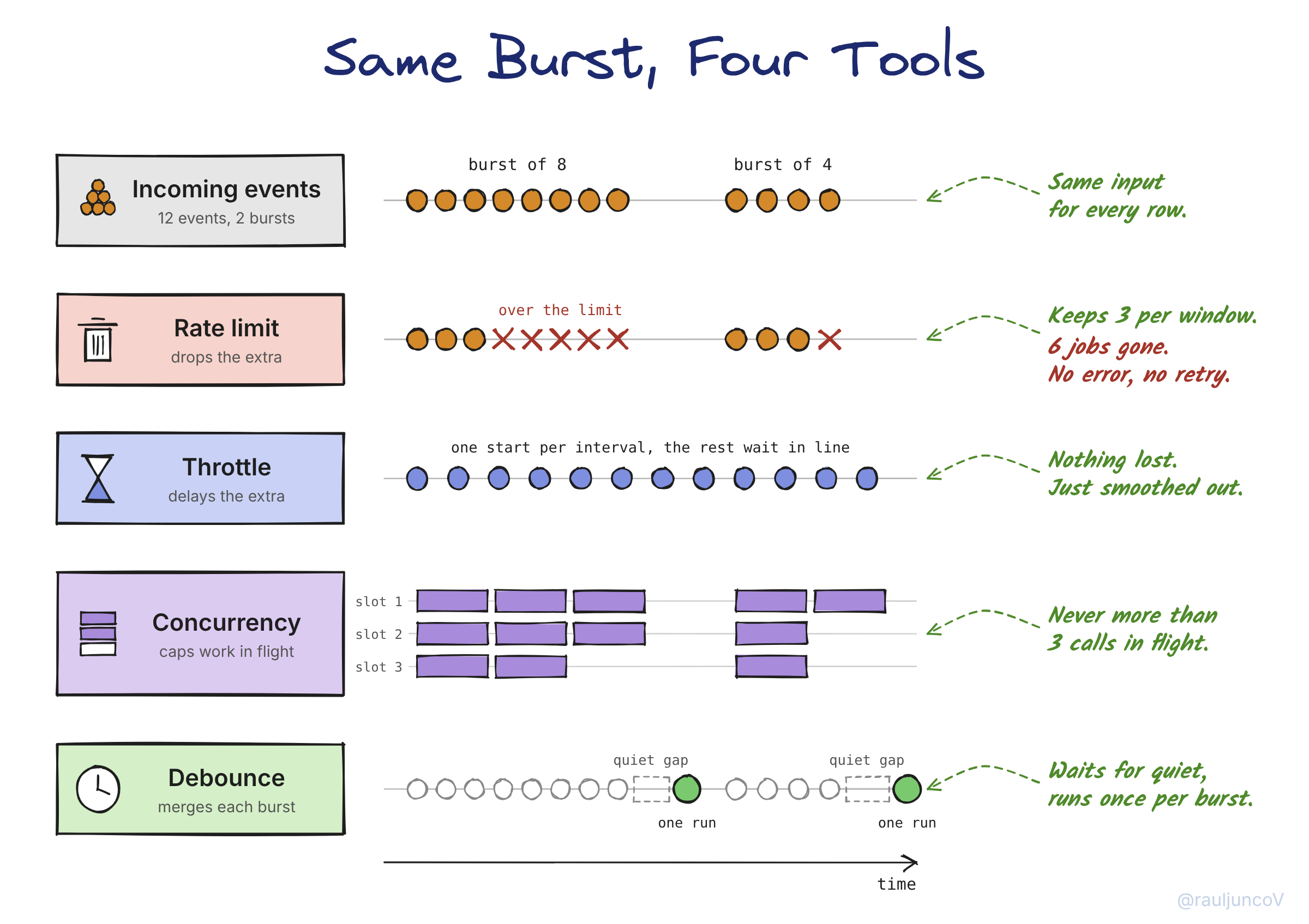
Pay attention to what happens to the excess. It’s not the limit that’s important. Think about what happens after the limit is surpassed. Consider the following options when talking about adding a rate limit: will you discard, delay, cap, or merge the excess?
Knowing the four tools is half the job. The other half is asking the right question first.
Four questions that pick the tool
I run through these in order.
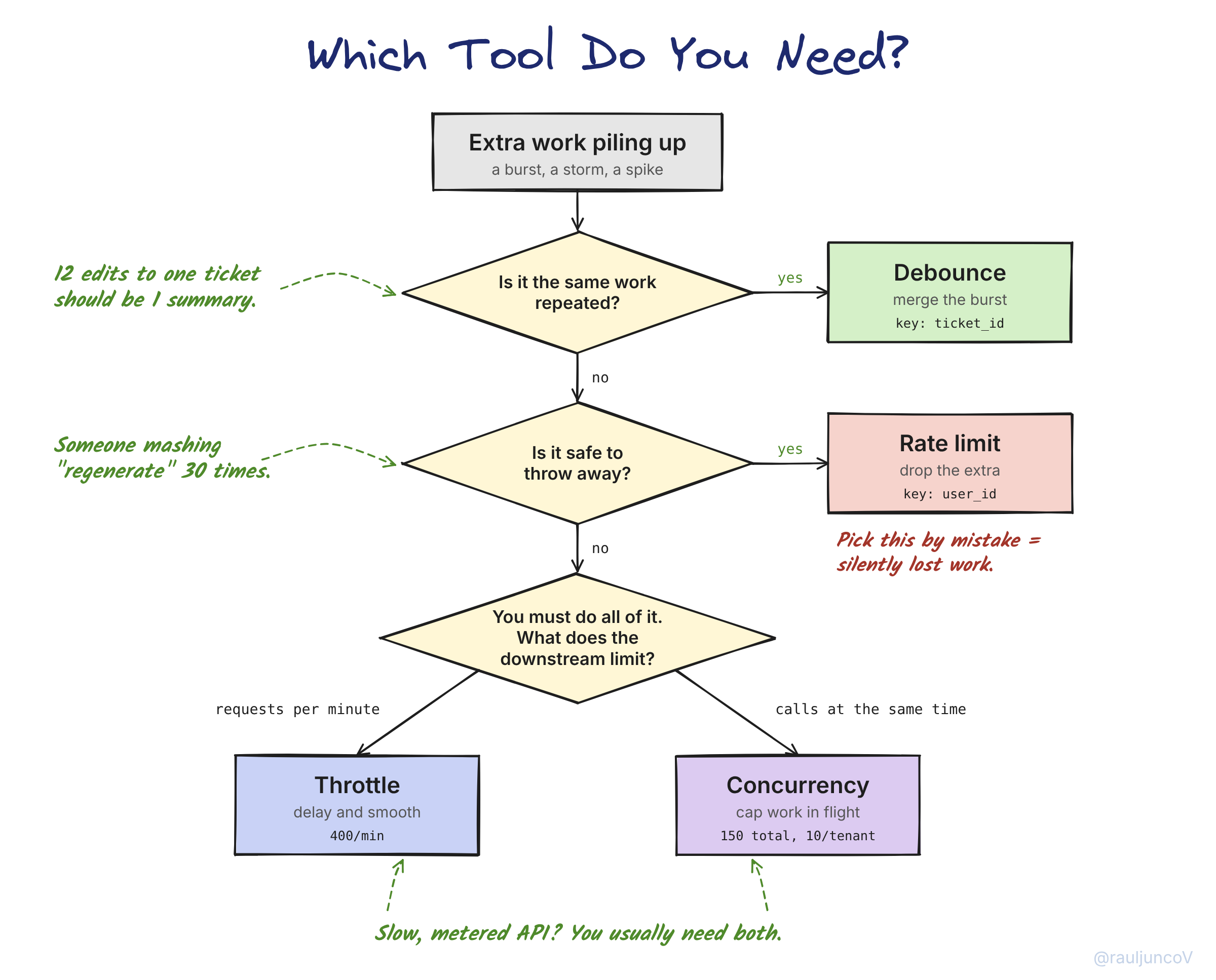
Is the extra work the same work repeated? Twelve updates to one ticket should produce one summary. That’s a debounce, keyed by ticket ID so each ticket gets its own quiet window.
Is the extra work safe to throw away? A user mashing “regenerate summary” doesn’t need 30 regenerations. Dropping those is a feature. That’s a rate limit.
Is the limit stated per unit of time? “500 requests per minute” is a rate. That’s a throttle.
Is the limit about work happening at the same time? A connection pool, a slow upstream, a provider that caps concurrent requests. That’s concurrency.
Most people miss the part where Little’s Law relates throttle and concurrency. Work in flight is equal to the arrival rate multiplied by the average time it takes to complete a job.
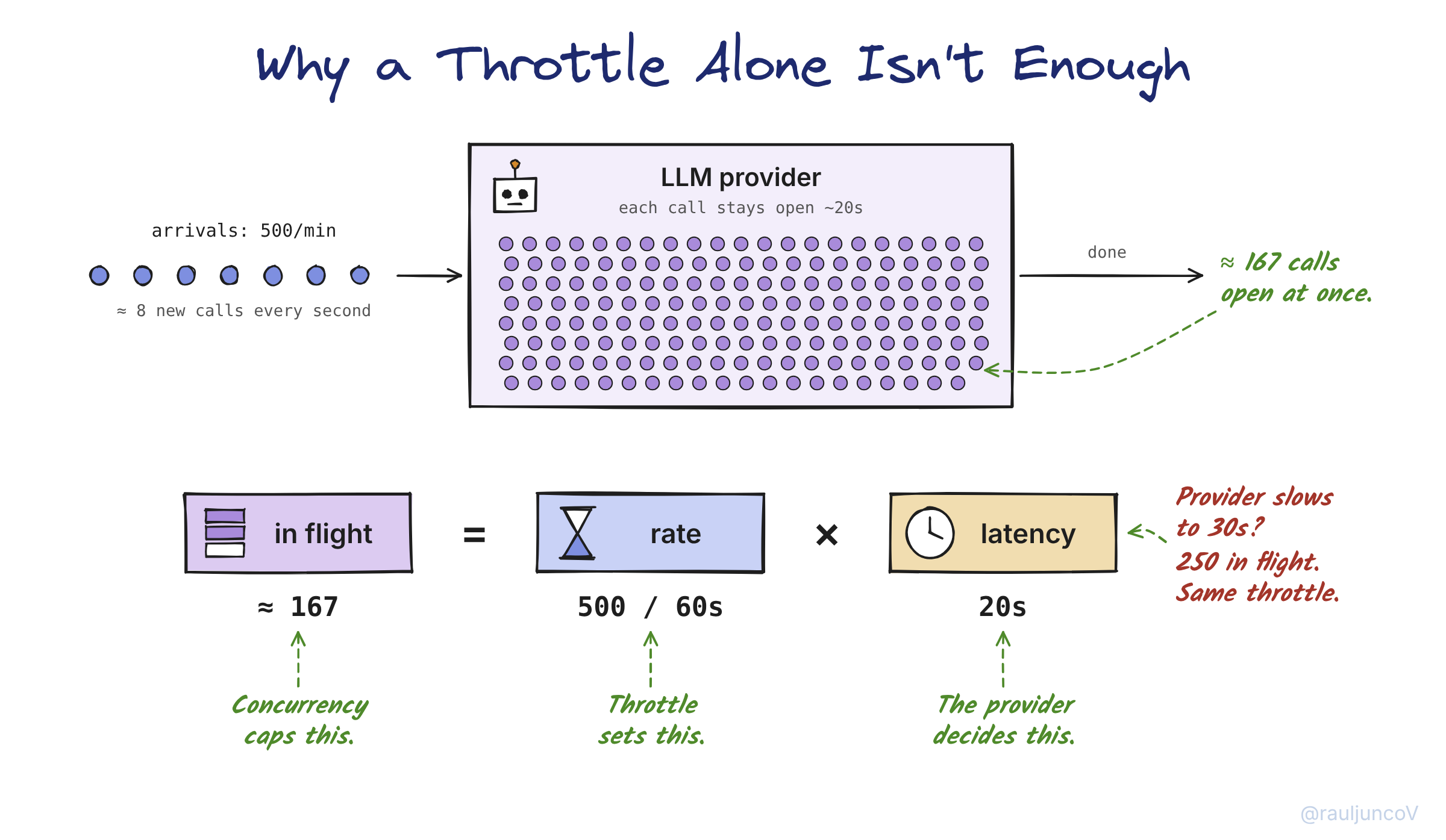
So a throttle of 500 per minute can still put 167 calls in flight. If your service chokes at 100, the throttle alone won’t save you. And a concurrency cap alone won’t stop you from blowing a per-minute quota when calls happen to be fast. For a slow, metered API, you usually need both.
So what did the fixed pipeline look like?
The fixed pipeline
I rebuilt the summarizer so each tool does one job, in a specific order:
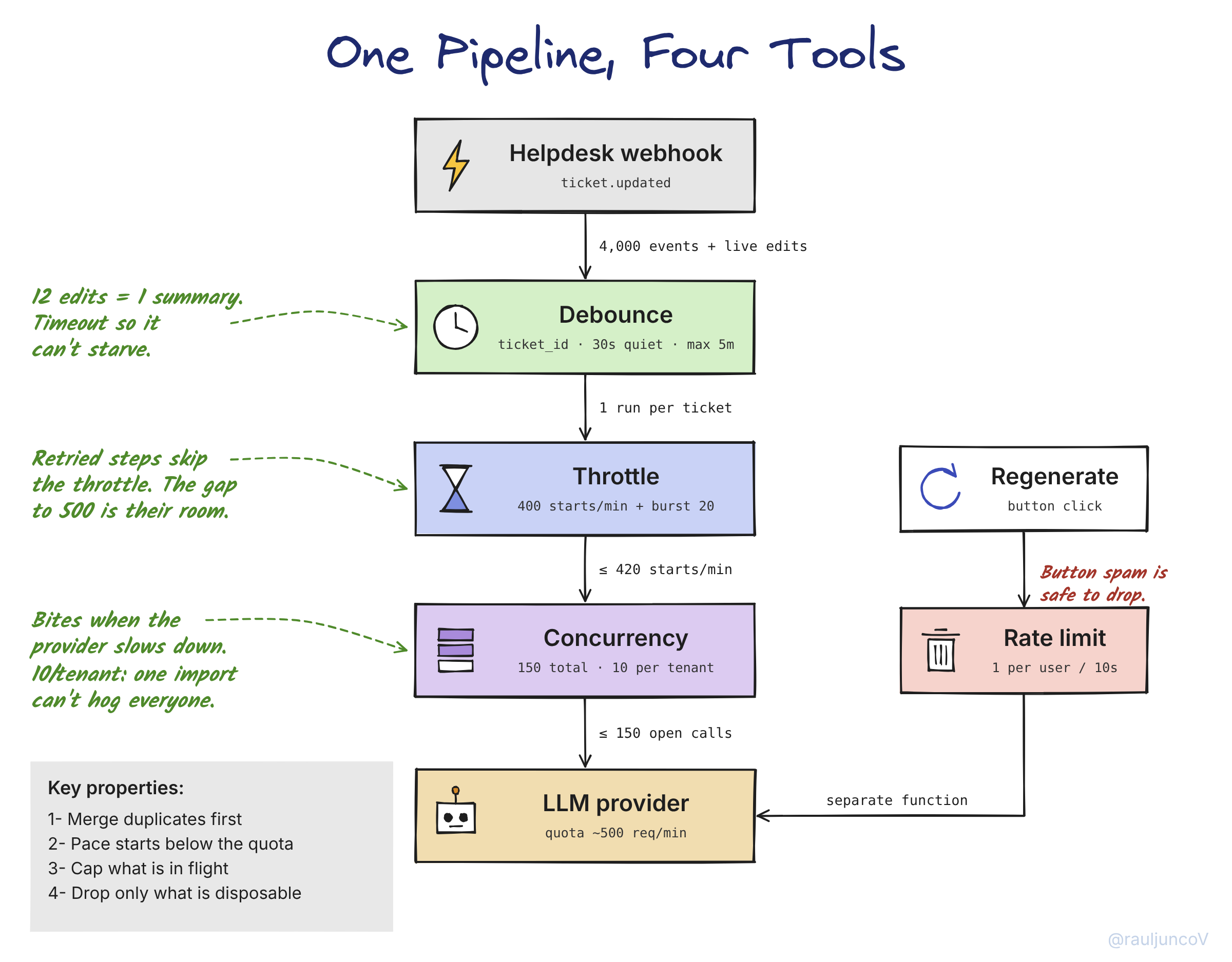
By the way, building this by hand means Redis counters, a delay queue, a semaphore, and a pile of edge cases. In Inngest, it’s function config:
export const summarizeTicket = inngest.createFunction(
  {
    id: "summarize-ticket",
    triggers: { event: "helpdesk/ticket.updated" },
    debounce: { key: "event.data.ticket_id", period: "30s", timeout: "5m" },
    throttle: { limit: 400, period: "1m", burst: 20 },
    concurrency: [
      { limit: 150 },
      { key: "event.data.tenant_id", limit: 10 },
    ],
  },
  async ({ event, step }) => {
    const ticket = await step.run("load", () => getTicket(event.data.ticket_id));
    const summary = await step.run("summarize", () => llm.summarize(ticket));
    await step.run("save", () => saveSummary(ticket.id, summary));
  }
);
Why 400 and not 500? With burst: 20, up to 420 runs can start in a minute. And a throttle only gates run starts, not the steps inside them, so a retried LLM call hits the provider on top of those 420. The gap to 500 is the room those retries need.
The concurrency cap tells a similar story. With 400 starts allowed per minute and calls taking 10 to 20 seconds, Little’s Law implies 67 to 133 calls in flight. The cap only starts to bind when a call takes longer than 22.5 seconds; that’s 150 in flight at 400 per minute. Say the provider slows to 30 seconds: demand now wants 200 calls open, but the cap holds the line at 150. Throughput settles at 300 starts per minute instead of 400. That’s the cap doing its job; trading some throughput to protect a provider whose latency spiked. And during an import, one tenant’s demand often exceeds its per-tenant cap of 10, so its runs queue up while everyone else keeps moving.
The regenerate button gets its own function with rateLimit: { key: "event.data.user_id", limit: 1, period: "10s" }.
I like that Inngest distinctly separates delays and drops. Rate-limited events cause Inngest to skip work, while throttled work is queued. The bouncer, followed by the turnstile, are both features of the Inngest scheduler.
The pipeline is much better now, but it still has sharp edges.
Where it still bites
Debounce can cause starvation. In the case that an agent edits a ticket every 20 seconds, and the window is set to 30 seconds, the window would stay open and the summary would not be calculated. The summary would only be calculated after 5 minutes of waiting, due to the timeout configuration. Debounce also hands you only the last event, so the payload you receive may already be stale. Don’t trust it; load fresh state inside the function (that’s the load step above) and summarize what’s actually in the ticket now.
Throttling disguises overload. When events keep arriving faster than 400 per minute, the queue grows without bound. Nothing will fail the process. Summaries just show up later and later. Alert on backlog age, and set a start timeout so stale runs get cancelled instead of processed an hour late.
Order matters. Inngest always applies flow control in the same order. Rate limiting runs before a run is even scheduled. Debounce decides what enters the queue. Concurrency gates steps as they execute. A rate-limited event skips everything after it, so it never reaches the debounce.
Requests and tokens are not equivalent. LLM providers usually cap tokens per minute as well as requests. 400 short tickets fit. 400 tickets with 30-message histories might not. Throttle on whichever limit binds first, and trim long inputs.
Window edges leak. A counter that resets every minute permits 500 requests in the last second of the minute, and another 500 in the first second of the next minute. That is 1,000 requests in two seconds. Tokens in a token bucket are released over the duration of the interval. The same is true for the Inngest GCRA.
Which brings me back to that night.
What I’d tell my past self
If I could go back to that night, I wouldn't change anything but the word I used. I said “rate limit,” but I meant 4 separate things. Merge the duplicate edits. Pace the import. Cap the calls sitting open at the provider. And keep one customer from eating everyone else’s capacity.
Only one of those is a rate limit, and it’s the only one that throws work away.
Funny thing is, it took days to clean up the mess caused by the quick fix, but shipping it only took a few minutes. Making a quick fix always overlooks the most important questions, and that's why it's fast.
So what’s the lesson in all of this?
If you want the short version, here it is. A rate limit drops the extra work, so only use it when that work is safe to lose. A throttle makes the extra work wait its turn. A concurrency cap limits how much runs at the same time. And a debounce turns a burst of the same work into one run.
Here’s what I do now. Before I add any limit, I write one sentence about what happens to the extra work. Drop it, delay it, cap it, or merge it.
If I can’t write that sentence, I’m not ready to ship the fix.
Anyway, that’s flow control. Four tools, one question.
Until next time, keep asking what happens to the extra work.
— Raul
System Design Classroom is a reader-supported publication. To receive new posts and support my work, consider becoming a paid subscriber.